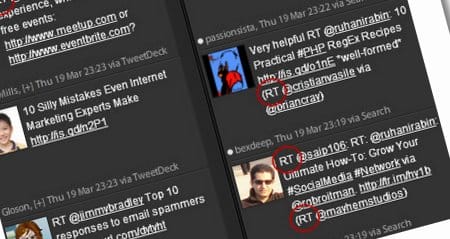
When Twitter started off, it was nothing but a place to put your status. Now, Twitter has expanded to become a Social Media Giant and fastest means of communications. With its powerful information sharing, it turn into a stream of up-to-date news. Over its last few years, Twitter came up with several actions, acronyms and tagging. One of the most useful action is “Re-Tweet”.
Updated Nov 5, 2009
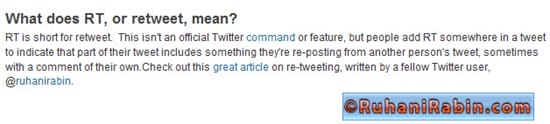
Thanks Twitter Management for being generous.
What is RT or Re-Tweet?
Re-tweeting is a popular way to share a useful or interesting tweet. When you browse your friends or public tweet stream and found something useful. Most probably you would like to share that with your Twitter followers. They might not know about it. Therefore, you copy some ones tweet; append RT along with their name and post it back. Then it is instantly available for your contacts or the public.
Benefits of Re-tweeting
- Increases visibility of you to other people and inside the public information stream.
- You re-tweet someone’s tweet and it’s instantly visible to the public stream and to your Twitter friends and followers.
- Credit passed along by tagging the original poster and current posters name. It is a polite manner.
- Slowly but most likely build contacts related to your interests and topics
- Passive marketing of yourself by helping others
When you should Re-Tweet?
- A post has useful information that you like to share it within your followers
- A post that has helpful information that can help out other users of similar interests
- Information exchange and appreciate good tweets
What do You need if you want to do “Re-tweet”?
Twitter itself doesn’t provide an option to re-tweet (yet). So you need to get this feature from 3rd party applications.
- Get a desktop application such as Twhirl, TweetDeck or Seesmic. See my previous post about Great Twitter Desktop Applications.
- Start using one of the advance twitter web applications such as HootSuite.com, iTweet.com, TwitZap.com
Having mentioned the points above, RT posts by many people might lead simple users to confusion. Usually when you use twitter clients like Twirl or TweetDeck; they instantly attach the text “RT @username:” before the original post.
How Not to make a Mess when You “Re-tweet”
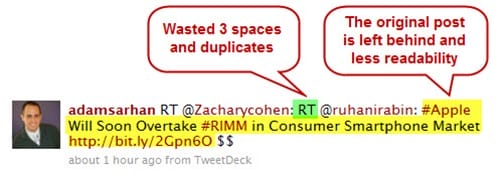
The concept of “Re-tweet” is simple, but flawed in some way. Using the “RT” prefix worked well when less people RT, but too many RT’s are not really scalable or clean. Too many RT of a single post makes it almost unreadable. It keeps on growing by adding the text “RT @username” at the beginning of the original post. Take a moment to look at the example below:
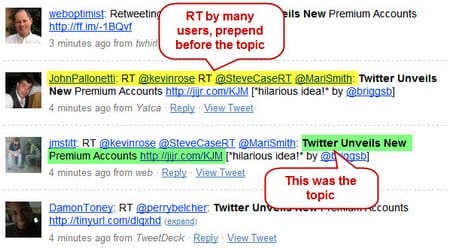
By now you have the idea how the Re-tweet might look like when they are re-tweeted by many users. Another simple example would be:
Importantly we should not forget the limitation of 140 characters. Every time any one re-tweets, it can easily add up to 12+ characters into that tweet.
Re-formatting of Re-Tweets
The confusion of looking at RT topics can be minimized and presented in a much more easier and readable manner. Here are some ideas:
- Take extra 20-30 seconds of your time to analyze the post before you actually re-tweet it
- Set your re-tweeted or tweeted post limit to 120 characters. That way you will have free space if someone wants to re-tweet your post.
- Never modify the short link posted by the original poster of the tweet. Do check the link
- Move the RT @username part to the end of the post
- Remove duplicate words and hashtags from your post
- Format RT possibly in this manner at the end of the post “This is a post that is re-tweeted (RT @username1 via @username2 @username3)”. Let’s explain the RT, it is originated from username1. Then username2 and username3 re-tweeted the post of username1. I will cover this part later in this post.
- Use the word RT if you want to identify the original poster. Use the word “via” when you found it via someone else.
- Make use #hashtags to identify important keywords but do not to overload it.
- Appreciate and Thanks other users who’ve re-tweet your posts
- Whether it is a link, quote, or interesting information, add value to what’s been said before by contributing in your own words something relevant to the content. Give your opinion, be critical, be complimentary. This presents that you have actually looked at it rather than just simply forwarding it on.
Here is an example of a well formed Re-tweet.
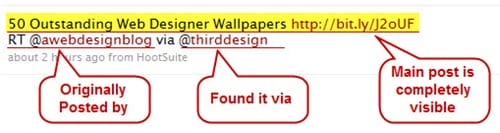
What if there is not enough space to RT?
Sometimes when you retweet a tweet from someone which has been retweeted by few other user, you might not have enough space to RT with all their names. What you should do under these situations? Try to determine the original poster or just keep the name of the user you have found the tweet from.
Consider the example given below:
50 Outstanding Web Designer Wallpapers http://bit.ly/J2oUF RT @awebdesignblog via @thirddesign @FlipBooks @sheconsulting @designerfoo
Explanation: The tweet above is originated from @AWebDesignBlog and you found it via @designerfoo, the problem here is the tweet became too long, so you keep the originator and retweet that. Which would look like this:
50 Outstanding Web Designer Wallpapers http://bit.ly/J2oUF RT @awebdesignblog
Another example of a tweet without an originator:
50 Outstanding Web Designer Wallpapers http://bit.ly/J2oUF RT @awebdesignblog @thirddesign @FlipBooks @sheconsulting @designerfoo
Explanation: It is hard to determine who is the originator of the above tweet. So you keep the person’s name you found the tweet out from. Lets say you found it from @designerfoo. So you can retweet following the example below:
50 Outstanding Web Designer Wallpapers http://bit.ly/J2oUF RT @designerfoo
Note: It is highly advisable to look for the original poster of the tweet. If you can’t find the originator then only apply above method.
When you should use “via”?
“Via” represents a “Medium”. Here is a scenario. Person1 posted a tweet. Person2 re-tweet that post. Person3 re-tweet Person2 post. Consider the example given below:
50 Outstanding Web Designer Wallpapers http://bit.ly/J2oUF RT @awebdesignblog via @thirddesign @FlipBooks
Explanation: The tweet above is originated from @AWebDesignBlog and you found it via @ThirdDesign and @FlipBooks
When you should use “by”?
It’s pretty simple. “By” represents that the tweet written by the user. It is the tweet of the original author of an article. Consider the example given below:
Lazy Blogger’s guide to Super Charge #WordPress with 100+ Plugins http://j.mp/4wCrC2 by @ruhanirabin via @featureBlend @FlipBooks
Explanation: The article in the tweet above is written by me @ruhanirabin and you found it via @tech_Blend and @FlipBooks
Define the Readability
Most of the Twitter Desktop Applications attach the format “RT @user1: “at the beginning of the original post. I would strongly advice not to follow that format.
The question raised “Why?” Take a moment to look at the image below
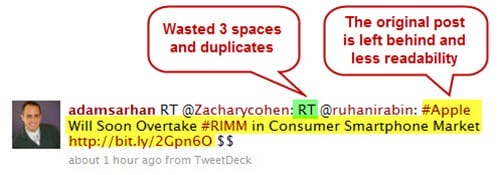
Now take a look at more Readable “Re-tweet” below
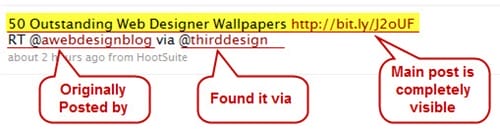
Example above clearly defines the readability of the post and the person(s) who re-tweeted it.
Summary
Many popular twitter users are so dependent on the desktop software. They don’t really check how readable their posts are.
A little bit more details? Yes, the soul purpose of Re-tweet is to share useful information. Desktop software adds “RT @username” at the beginning of the post. So it is become hard for the human eye to find the original topic. Why? Because usually we read text from left to right.
You can easily make changes when you re-tweet. This makes it easier for your followers to read.
I welcome your comments. Be sure to stay up to date with my RSS Subscription, the easiest, fastest way to keep up with what’s happening on my site.