

Did you have problems setting up PHP on a Windows server that is running IIS and an SMTP server inside IIS? Have you faced problems sending mail from PHP scripts running on the IIS server with the IIS SMTP engine? By default, IIS doesn’t allow relaying SMTP emails if it comes from 3rd party products. So this problem is related to IIS SMTP “Relay Restrictions”. Sometimes some of my clients are using PHP on Windows servers using IIS 6 as the webserver. In Linux, PHP supports the native Sendmail system from the OS itself. But in windows, you need to tweak your way to make PHP able to send out mail from localhost. If you are a .Net developer, you might already know that from ASP.Net codes or even Classic ASP code, it’s just as simple as 1,2,3 to send out an email or use the IIS local SMTP server. Let me make it simple for you so that you guys can use the localhost server from PHP.
More information is at the end of the article about using XAMPP Sendmail in Windows.
Here is the stuff needed to do:
1. Install and Configure IIS with PHP
First, install and configure PHP 5 as described in the PHP documentation. Try to avoid the Windows-based binary installer. Download the full package and install it manually.
2. Test out PHP Pages
Once you’ve done with the installation. Test it out with a sample PHP info page. If PHP is able to execute the pages on the server then we are ready for the next step.
3. Test email sending from PHP
Now we need a test script to check whether we are able to send email using PHP. Here is a sample script that will aid you out in this situation. Copy the content from this code and save it as email_test.php at your server root. Then try to run the file online (eg. mydomain.com/email_test.php) if it returns “not ok” means you are not able to send an email out. You can change the ‘[email protected]’ into your email address so that you can receive the mail if it’s a success.
Contents of email_test.php:
<?php
if(mail('[email protected]','test subject','test message')){
      echo('ok');
    }
else{
      echo('not ok');
    }
?>
4. Configure PHP.INI for SMTP
Let’s stop IIS from the IIS Manager. Now open your PHP.INI file. It could be on your C:\PHP folder or C:\WINDOWS folder. Depends on how you’ve configured IIS and PHP on your system. Once you’ve opened the PHP.INI file with notepad or something, search for the entry called “[mail function]” and set it as below.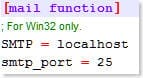
Save and close the PHP.INI file.
5. Configure IIS SMTP Relay Restrictions
Once you’re done with PHP.INI, head over to Internet Information Services Manager. Assume that the IIS is running an SMTP server also to send out emails. You should be able to see the entry inside the IIS manager stated “Default SMTP Virtual Server” or similar items. Now, right-click and access the properties page from “Default SMTP Virtual Server” as it’s shown below.

on the properties page move to “Access” tab and click on “Connection” and you will be able to see which servers/IP’s are allowed to make a connection to the server. If “127.0.0.1” IP is not there on the list, add it using the “Add” button, additionally, you may also insert your server IP on the list.

Once you are done at the “Connections” window, click on the OK button to accept the information. Now Click on the “Relay” button at the “Access” tab and set up the relay options for the server. Grant the IPs’s allowed to relay out mail for the mail server. Make sure “localhost” and IP “127.0.0.1” are granted for the relay, In addition to that, you can also insert your domain name and IP.

Once you are done with the “Relay Restrictions” window, click ok to accept the options and then click “Apply” and “Ok” buttons respectively to go back to the main screen of IIS Manager.
Now you can restart IIS from the IIS manager.

6. Try sending email again
Now for your testing run the email_test.php file again. It should give you the response “ok“. If it’s not please check your SMTP configuration one more time along with PHP server settings and PHP.INI file.
While you are here, you can also find out the information about
How to use XAMPP on windows to send mail out using PHP
You can send mail from localhost with Sendmail package, Sendmail package is inbuild in XAMPP. So if you are using XAMPP then you can easily send mail from localhost.
for example, you can configure C:\xampp\php\php.ini and c:\xampp\sendmail\sendmail.ini for Gmail to send mail.
in C:\xampp\php\php.ini find extension=php_openssl.dll and remove the semicolon from the beginning of that line to make SSL working for Gmail for localhost.
in php.ini file find [mail function] and change
SMTP=smtp.gmail.com
smtp_port=587
sendmail_from = [email protected]
sendmail_path = "\"C:\xampp\sendmail\sendmail.exe\" -t"
Now Open C:\xampp\sendmail\sendmail.ini. Replace all the existing code in sendmail.ini with the following code
[sendmail]

smtp_server=smtp.gmail.com
smtp_port=587
error_logfile=error.log
debug_logfile=debug.log
[email protected]
auth_password=my-gmail-password
[email protected]
Now you have done!! create a PHP file with mail function and send mail from localhost.
PS: don’t forget to replace my-gmail-id and my-gmail-password in the above code. Also, don’t forget to remove duplicate keys if you copied settings from above. For example comment following line if there is another sendmail_path : sendmail_path="C:\xampp\mailtodisk\mailtodisk.exe" in the php.ini file
Also, remember to restart the server using the XAMMP control panel so the changes take effect.
For Gmail please check https://support.google.com/accounts/answer/6010255 to allow access from less secure apps.
To send an email on Linux (with Sendmail package) through Gmail from localhost please check PHP+Ubuntu Send email using Gmail from localhost.
CREDIT: The information above is collected from StackOverflow answer.
If you would like to use PHP/MySQL/Apache from a portable drive, you can check this article.