

Roughly 92 percent of product teams miss at least one major goal each year, even though they ship new features almost every week. When I look at why, it rarely comes down to ideas or engineering skill. It comes down to retention. If people do not stay, no roadmap can save the business, no matter how many of the best product marketing tools for SaaS retention sit in the budget.
Enhancing customer retention using proven methodologies shows there is a sixty to seventy percent chance of selling to an existing customer and only a five to twenty percent chance with a new one. Yet most SaaS teams still push eighty percent of their spend into acquisition tools and campaigns. That is like pouring water into a bucket with a hole in the bottom and then arguing about how wide the hose should be.
After more than twenty-five years working on SaaS and WordPress products, I have watched the same pattern repeat. Companies buy every tool in a category, wire up a few dashboards, send some email blasts, and hope churn will quietly drop. It does not. The problem is not that tools are bad. The problem is that tools are bought and used without a retention plan.
This article is not another fluffy list of “top tools” copied from vendor sites. I am going to walk through a simple way to think about product marketing tools for retention, the mistakes I see in real teams, and the five categories that matter. Then we will go through twelve tools, including my consulting work at Ruhani Rabin, organized by how they move activation, engagement, expansion, and renewal.
Read to the end and you will know which tools to keep, which ones to drop, and how to build a product marketing stack that reduces churn instead of just adding more logins.
Understanding Product Marketing Tools in the Context of SaaS Retention

How to Sell SaaS: A Model for Main Factors of Marketing and Selling Software-as-a-Service reveals that most people hear product marketing tools and think about launch emails, landing pages, and campaigns. Those belong in the picture, but they are not where retention is won. For SaaS, retention lives inside the product. The tools that matter most are the ones that track behavior, remove friction, and keep users coming back without needing a sales call every time.
For retention, product marketing tools are best seen as software that observes how people use the product, automates well-timed messages, gathers feedback at key moments, and guides users through confusing steps. These tools do not just send email. They shape the entire path from first login to expansion. Think in terms of activation checklists, in-app tips, churn alerts, surveys, and lifecycle campaigns that react to what people actually do in the product.
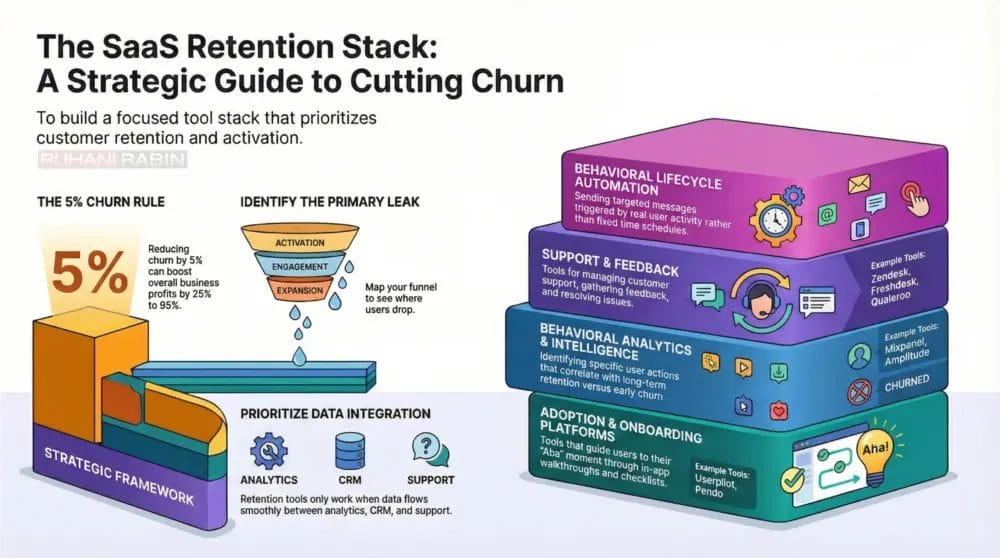
The economics back up this focus. Dropping churn by even five percent can grow profit by twenty-five to ninety-five percent because customer lifetime value compounds with every extra month a user stays. When a stack of tools helps one group of users reach their aha moment and stick around, every later upgrade or cross sale gets easier and cheaper. That is why the best product marketing tools for SaaS retention are worth more than another ad channel.
“What gets measured gets managed.”
— Peter Drucker
There is a catch. Tools only matter if they are tied to a specific retention problem. High sign-ups but low activation demand different tools than strong activation but weak expansion. Buying a “customer engagement platform” because a peer mentioned it in a Slack group is not a plan. It is shopping.
So set the right expectation. There is no single tool that “fixes churn.” A healthy stack works like a relay team. One tool helps people start, another shows which behaviors matter, another reaches out when those behaviors drop, and another lets users ask for help or share feedback. When each tool has a clear job tied to retention, the overall system starts to work.
Why Most SaaS Companies Get Their Product Marketing Stack Wrong

Most SaaS teams do not suffer from a lack of tools. They suffer from tool bloat. I often step into companies paying several thousand dollars a month for products that barely move key metrics. The patterns behind that waste are very consistent.
Mistake one is tool selection with no strategy. A founder hears that Intercom or HubSpot helped a friend’s startup and adds it to the budget. A marketing lead sees a “product‑led growth” case study and buys whatever tool was mentioned. Nobody stops to ask which part of the retention path is leaking and whether this specific tool addresses that leak. The result is a set of tools that look impressive in a slide deck but do not fix real problems.
Mistake two is caring more about features than integration. Retention depends on data moving smoothly across analytics, CRM, support, and billing. If your product analytics do not talk to your marketing automation, then “at risk” users get treated the same way as healthy ones. If your support team cannot see usage data, they answer tickets in the dark. Teams end up exporting CSV files, gluing tools together with half-broken zaps, and making decisions from partial views.
Mistake three is watching vanity metrics instead of retention outcomes. Open rates, click rates, and NPS scores can be useful, but only as leading indicators. I see dashboards full of colorful charts while nobody in the room can answer a simple question about whether monthly churn went down after the last change. A tool that improves open rates but does nothing for thirty-day retention is a nice-to-have, not a must-have.
“Without data, you’re just another person with an opinion.”
— W. Edwards Deming
Mistake four is building for scale before product-market fit. Early-stage startups sign contracts for enterprise platforms that take months to configure. They burn cycles on user roles, complex segments, and custom objects while activation sits at twenty percent. In that stage, three or four focused tools beat twelve half-used licenses every time.
The fix is straightforward, though not always easy. Map your retention funnel from sign-up to renewal, measure where people drop off, and pick one primary leak to attack first. Only then choose a category of tools that exists to fix that type of leak. The rest of this article is built around that way of thinking.
The 5 Core Categories Of Retention-Focused Tools And When You Need Each

To build a stack that improves retention, it helps to stop thinking in vendor labels and start thinking in categories tied to behavior. I group the best product marketing tools for SaaS retention into five types, each linked to a clear part of the user path.
The first category is product adoption and onboarding platforms. These tools help users reach their aha moment faster by guiding them through key actions. When analytics show strong sign-ups but weak activation or a sharp drop after the first login, this category moves the needle. Key capabilities include in-app walkthroughs, checklists, tooltips, and feature callouts that do not require code. The direct payoff is higher activation, which is one of the strongest predictors of long-term retention. A common pattern is users starting a trial but skipping vital setup steps; a good onboarding layer keeps them on track.
The second category is behavioral analytics and product intelligence. These tools record events inside the product and reveal which behaviors tie to long-term use or early churn. If you are making roadmap calls based on opinions rather than data about what engaged users do, you need this category. Features such as funnel views, cohort reports, and behavioral segments show where people stall and which actions healthy users share. The tradeoff is that you must invest in tracking events and interpreting the data, which takes engineering and analysis skill.
The third category is marketing automation and lifecycle engagement. These tools send messages based on real behavior rather than fixed schedules. They matter when your team cannot manually reach every at-risk account and you need consistent follow-up. The strongest options can read product usage data, score accounts, and fire targeted email or SMS when activity drops. Their retention impact comes from catching users before they silently leave and nudging them back to key actions.
The fourth category is customer feedback and voice of customer tools. Analytics can show what users did, but not why they did it. When churn rises and nobody can explain the reasons, this category earns its keep. In-app surveys, exit questions, and contextual prompts surface the tensions behind the numbers. I have seen teams run NPS for years and never act on it. Feedback tools help only when someone owns reading responses, spotting patterns, and pushes changes.
The fifth category is customer support and self-service platforms. Many teams see this as “just support,” but that is a mistake. Poor support is often a top three churn driver for B2B SaaS. When users hit problems, the speed and clarity of your answer can decide whether they stay. Strong support platforms offer searchable knowledge bases, chatbots, ticket queues, and resource centers. They reduce friction both at activation, by helping people get started without waiting on a person, and during day-to-day use, by lowering frustration.
A healthy stack has at least one effective tool in each category, but the budget and focus should match your biggest leak. If people never activate, spend more on adoption tools. If activity drops after the second month, invest in analytics and lifecycle campaigns first.
The 12 Tools That Actually Drive Retention Organized By Impact
There are hundreds of products that claim to help retention. The twelve below show up again and again in real work with SaaS and WordPress product teams. The list starts with strategy because tools only work in the hands of a team that knows what to fix.
1. Ruhani Rabin – Strategic Product & Retention Consulting

Before picking tools, you need to know why users churn and where the path breaks. This is where my consulting work under the Ruhani Rabin brand fits. I help teams diagnose the real retention problems through data review, user research, and product walkthroughs, then turn those findings into a simple plan that tools can support.
For many SaaS and WordPress products, the core issue is not missing features but a confusing flow or a weak value story. Through product and UX diagnostics I point out friction points that no onboarding widget can hide. We examine activation data, support tickets, and upgrade patterns to see what keeps people from reaching value and what separates loyal customers from casual ones.
After many years in digital product leadership, I have seen the same waste many times. Teams ship features that do not match user needs, then buy more analytics and marketing tools to figure out why numbers stay flat. I help teams flip that order. We clarify who the product is for, what success looks like for those users, and which moments along the way must work every time.
This service is the best fit for B2B SaaS founders and product leads who already pay for tools but still fight high churn or flat expansion. Once the strategy is clear, tools like Userpilot, Mixpanel, and Encharge become far easier to configure. You know which metrics matter, which segments deserve special focus, and which automation flows are worth building.
2. Userpilot – Product Adoption & Onboarding Platform
Userpilot sits firmly in the adoption and onboarding category. It helps new users reach activation through on-screen guides, checklists, and contextual help layers that do not require code. When your analytics show that a large share of sign-ups never touch core features, this type of platform can change the picture fast.
One of Userpilot’s strengths is the no-code builder. Product and growth teams can design step-by-step tours, prompt users to try key actions, and show feature announcements without waiting on a release cycle. It also includes built-in analytics such as feature tagging, funnel reports, and simple retention views. For many early-stage teams this removes the need for a separate product analytics tool.
Userpilot also offers a resource center that lives inside the app, where users can search docs, watch videos, or trigger guides. This trims support load and makes self-service easier. The main limitation is that it focuses on web applications. Companies where mobile apps carry most of the usage may find Appcues or other tools a better match.
In practice, Userpilot works best for mid sized B2B SaaS businesses with at least one product manager and some traffic volume. It integrates with tools like HubSpot, Salesforce, and Intercom, so usage data and engagement signals can flow across your stack. Used well, it raises activation and makes every later retention effort more effective.
3. Mixpanel – Behavioral Analytics Platform
Mixpanel is one of the most widely used tools for understanding how people move through a product. It tracks specific events inside your app, then lets you slice that data to see what healthy users do and where at-risk users stall. For any team that wants to move from guesses to data-backed decisions, it is a strong candidate.
With Mixpanel, you can build funnels that show exactly where users drop out of sign-up, onboarding, or feature flows. Cohort reports reveal how different groups retain over time, such as users from a certain campaign or those who tried a specific feature. Behavioral segments help you separate power users from casual visitors so you can compare their paths and spot key actions.
The real retention value comes from finding leading signals of churn. For example, you might learn that users who do not invite a teammate within seven days churn at twice the normal rate. That insight can feed onboarding tweaks and lifecycle campaigns that push more people toward that action.
The tradeoff is effort and skill. You must define events, work with engineering to track them, and have someone who can read the charts and turn them into decisions. Mixpanel makes the most sense for growth-stage SaaS companies with at least one person focused on data. It connects well with CRMs and marketing tools, which lets you trigger campaigns based on real behavior instead of just time-based rules.
4. Encharge – Behavior Based Marketing Automation For SaaS
Encharge belongs in the lifecycle engagement bucket and is built specifically for SaaS. Its main job is to send the right message when user behavior suggests fading interest or hidden potential. Instead of broad campaigns, it lets you design flows that react to logins, feature use, and billing events.
Because Encharge connects deeply with Stripe, Segment, and popular product analytics tools, it can score accounts based on real usage and payment history. You can mark customers as at risk when they stop logging in or when their usage drops below a threshold. Flows can then send focused emails, hand off to a customer success manager, or even push data back into your CRM.
The visual flow builder makes these paths easier to manage. You can map conditions such as “has not logged in for seven days and did not open the last two emails” and then pick an action. This structure helps you build simple reactivation plays and more complex win-back campaigns.
The main limit is that Encharge focuses on email and does not handle in-app messaging. Many teams pair it with tools like Userpilot or Intercom to cover that gap. It fits best for B2B SaaS companies with clear usage events and a need to scale retention outreach beyond manual work. When tied into a strong product analytics setup, it becomes one of the more direct marketing tools to improve user activation rates and long-term use.
5. Intercom – Customer Support & Proactive Engagement
Intercom bridges support and proactive engagement. It brings live chat, bots, and in-app messages together so users can ask for help and you can nudge them at key moments. When configured well, it reduces frustration while also lifting activation and feature adoption.
On the support side, Intercom’s bots and messenger handle common questions around the clock. Users can search help articles from within the widget, which means fewer tickets for simple issues. When a human agent is needed, they see the past conversations and basic user details in one place, which keeps replies clear and fast.
For retention, the proactive layer matters most. You can send targeted in-app messages to groups such as users who signed up seven days ago but never tried a core feature. You can also trigger nudges when someone hits an error, spends too long on a page, or returns after a long gap. Those touches often prevent quiet churn.
The main downsides are cost and complexity. Pricing climbs quickly as your contact list grows, and the feature set can overwhelm small teams. I usually advise companies with under one million in yearly revenue to begin with a simpler tool like Freshdesk, then consider Intercom when volume and use cases justify it. Intercom integrates well with tools like Salesforce, HubSpot, Stripe, and Mixpanel, which keeps teams aligned.
6. Pendo – Product Experience Platform Analytics + Guidance
Pendo combines analytics, in-app guidance, and feedback in a single product experience platform. It aims to close the loop between insight and action so you can see how users behave, guide them better, and collect their opinions without juggling multiple interfaces.
On the analytics side, Pendo tracks feature usage, flows, and retention across web and mobile. Product teams can identify which features tie to long-term use and where users struggle. Once a pattern appears, you can design in-app guides or walkthroughs and publish them to the right segments, all within the same tool.
Pendo also includes survey features that pop up inside the product, letting you ask users about satisfaction, new concepts, or reasons behind certain actions. This helps tie qualitative feedback to exact usage patterns. For retention, the strength lies in that tight loop. You notice that people get stuck on a settings page, add a guide, and then measure whether fifty-day retention improves for those who see it.
The tradeoffs are cost and learning curve. Pendo often prices for mid-market and enterprise budgets, and it takes time to master. It fits best for companies above five million in yearly recurring revenue with a product team ready to invest in setup. Integrations with tools like Salesforce, Gainsight, and Slack help customer success teams act on its insights.
7. Zendesk – Customer Support & Knowledge Management
Zendesk is a long-standing choice for structured customer support. Its strength lies in helping teams handle large ticket volumes while still giving customers self-service options. When support pain shows up as a top churn reason, Zendesk is worth a close look.
The core Zendesk suite brings email, chat, phone, and social requests into a single agent workspace. Automation rules route tickets to the right people, set due times, and escalate when service levels are at risk. This keeps response times under control even as the number of users grows.
Zendesk’s help center and community features let you build an online knowledge base. When users search there instead of opening tickets, both time to answer and support costs drop. For activation and retention, this means users can fix small snags on their own rather than giving up in frustration.
Some teams find Zendesk’s interface less flexible or modern than chat-first tools. It can also feel heavy for small startups. It shines for established SaaS companies with regular ticket volume and clear processes. Integrations with CRMs, Slack, and systems like Jira let product and support stay in sync.
8. Qualaroo – Contextual Feedback & User Surveys
Qualaroo focuses on catching user feedback in context. Instead of quarterly surveys that people barely remember, Qualaroo presents short “nudges” currently someone feels friction or interest. For retention, that direct voice of customer input is gold.
You can set Qualaroo to appear on specific pages or after certain actions. For example, when someone views the pricing page three times without upgrading, a small survey can ask what holds them back. When someone closes their account, you can ask a quick question about their main reason. Over time, these answers reveal patterns that analytics alone cannot show.
The tool offers strong segmentation, so different user groups see different questions. It also uses sentiment analysis to group open comments, which saves time as responses grow. The gain for retention is clear understanding of why people hesitate, downgrade, or leave so you can address the top themes.
The risk is that poor survey design or timing can annoy users. You need a simple plan for where to ask, what to ask, and how often. Qualaroo tends to fit product-led SaaS teams that already watch behavior data and want to add more whys to their view. It blends well with analytics tools such as Mixpanel and Amplitude.
9. HubSpot – All In One CRM & Marketing Hub
HubSpot brings CRM, marketing automation, and basic support into one system. For teams that want fewer vendors and a shared source of truth about customers, it often becomes the center of the stack. When used with care, it also helps with retention.
With HubSpot, every contact carries a full history of visits, emails, deals, and support requests. This makes it far easier for sales, marketing, and service teams to see the same picture. You can build workflows that welcome new customers, remind them before renewal, or trigger check-ins when usage falls below a set level based on data synced from your product.
HubSpot’s reporting shows the full path from first touch to renewal, which helps you spot where paying users came from and how long they stay. It may not go as deep as stand-alone analytics, but for many SaaS companies the convenience of one system outweighs that gap.
The main concerns are price and depth. As your contact list and feature use grow, monthly costs rise, and some advanced functions sit behind higher tiers. I see HubSpot fit best for SaaS companies where sales and marketing work closely and prefer a unified tool over many specialized ones. Thanks to a wide set of integrations and a solid API, it can still play well with more focused tools in your product marketing stack for onboarding optimization and beyond.
10. Akita – Customer Success & Churn Prediction Platform
Akita is built for customer success teams that manage account health across many customers. Its focus is simple to state and challenging to do without help. It watches signals across tools and tells you which accounts need attention before they churn.
Akita pulls data from product usage, billing, support, and CRM systems into one view for each customer. Based on rules you define, it assigns a health score that changes in near real time. When a score drops, Akita can create tasks, send alerts, or kick off playbooks that guide your team through the next steps.
Those playbooks might cover onboarding check-ins, renewal prep, or win-back attempts. The result is a more consistent approach to keeping high-value customers happy. Instead of guessing who to call this week, your team works through a clear queue driven by data.
The downside is that Akita requires enough customers and activity to justify the effort. Small teams with fifty accounts they talk to every week do not need this level of structure. It suits B2B SaaS companies with higher contract values and a dedicated success function. When wired into analytics and support tools, Akita becomes a key piece for a marketing stack for reducing customer churn.
11. Amplitude – Advanced Product Analytics & Experimentation
Amplitude sits at the high end of product analytics. If Mixpanel helps you move from gut feel to clear data, Amplitude pushes into deeper questions and ties tightly to experimentation. For teams with analysts and data engineers, it can show where to focus for major retention gains.
With Amplitude, you can build detailed behavioral cohorts that track how specific groups act over long periods. You can explore common paths through the product, see which actions often precede upgrades, and examine where people drop off. Root cause analysis features help trace those patterns back to specific events or product changes.
One of the standout features is its experiment platform. You can run A or B tests on new flows, features, or prices, then read the impact on activation, engagement, and revenue. Instead of guessing whether a change helped, you see clear data on retention curves for each variant.
The tradeoff is heft. Amplitude takes more time and skill to implement than lighter analytics tools. It tends to fit SaaS companies above five million in yearly recurring revenue with at least one analyst dedicated to product data. It integrates with warehouses, customer data platforms, and marketing tools for product-led growth marketing that works across channels.
12. Freshdesk – Affordable User-Friendly Support Platform
Freshdesk covers the support and self-service needs of early-stage teams at a price that does not crush the budget. If you are pre-product-market fit or under one million in yearly revenue, this is often the smartest starting point.
The platform pulls email, chat, phone, and social messages into a single ticket queue. Simple automation rules route tickets, apply canned replies, and enforce response time goals. This keeps basic support under control without a large team. Freshdesk also includes a help center where you can publish guides and FAQs, which gives users ways to help themselves.
For retention, the main benefit is that customers get timely, clear answers instead of silence or scattered replies across inboxes. The tool also includes short feedback surveys after tickets close, so you can spot unhappy users before they leave.
Freshdesk does not match Zendesk in depth for complex workflows, and its interface feels less modern than chat-first tools. That said, for startups and small SaaS teams it hits the right balance of power and price. It integrates with Slack, Google Workspace, and common CRMs, which keeps it connected without heavy engineering work.
How To Build Your Stack A Decision Framework Based On Retention Priorities

Buying tools at random is easy. Building a stack that genuinely reduces churn takes a bit more thought. Use this simple framework to decide what to buy now, what to add later, and what to skip.
Step 1 Identify Your Biggest Retention Leak
Start by mapping your path from sign-up through activation, early use, expansion, and renewal. For each step, measure how many people move forward and how many drop away. Even a basic cohort view in a spreadsheet can show where the steepest decline sits.
If half of your trial users never reach a clear aha moment, then activation is the main leak. If most customers are active in the first month but vanish by month three, you have an engagement problem. If users stay active but rarely upgrade or add seats, the issue lies in expansion. Pick one main weakness and focus on that first instead of trying to patch everything at once.
Step 2 Match Tool Category To Your Leak
Once you know the weak step, choose tools from the category built to help there. When activation is low, adoption and onboarding tools like Userpilot or Pendo, plus a basic analytics tool such as Mixpanel, will often have the biggest effect. They guide people to early value and show where they still struggle.
If engagement drops after the first month, lifecycle tools like Encharge combined with a customer success platform such as Akita can trigger timely check-ins and campaigns. When churn links to support complaints, your first dollars should go into a solid support platform like Freshdesk or Zendesk and a clear help center. When nobody knows why people churn, add feedback tools like Qualaroo along with analytics so you can see both behavior and reasons in one view.
Step 3 Start Small Then Expand Based On Data
For very young SaaS companies under five hundred thousand in yearly revenue, a three-tool stack is usually enough:
- One product analytics tool on a free or startup plan so you can see what users do in your app.
- One simple support system to handle questions in one place instead of across random inboxes.
- One feedback channel so you can ask churned or inactive users why they left.
This setup often costs less than two hundred dollars a month and already shows you where people get stuck.
As you move into the growth stage between five hundred thousand and five million in yearly revenue, you can add a product adoption tool, a lifecycle automation tool, and maybe a starter CRM like HubSpot. At a higher scale, you can graduate to deeper analytics such as Amplitude, a customer success system like Akita, and more advanced support tools. At each stage, let data guide the next addition rather than guesses.
Step 4 Prioritize Integration Over Features
A stack only works when data flows between tools. Before buying anything, check whether it connects cleanly to your core systems, especially your product database, CRM, and analytics. Nice features mean little if you have to import CSV files by hand every week.
If you find yourself wiring many tools together, consider adding a customer data layer like Segment or RudderStack. They can help you send the same clean events into analytics, automation, and support tools without one-off scripts everywhere. Give higher weight to a simple integration plan than to one more shiny feature you might never use.
Step 5 Measure Tool ROI By Retention Metrics Not Usage
Do not judge tools by how many campaigns you send or how many guides you build. Judge them by changes in retention. Before you roll out a new tool, capture baseline numbers for thirty-day retention, churn rate, and any internal health scores you track.
After sixty to ninety days of real use, compare those numbers. If churn dropped or thirty-day retention improved for the group touched by the tool, it is earning its place. If not, dig in. Maybe it is misconfigured, or maybe that category does not address your main leak. Be ready to cut even popular tools if they do not move numbers. That discipline keeps your stack lean and focused.
Common Mistakes To Avoid When Building Your Product Marketing Stack
Even with a clear plan, it is easy to waste money and time on the wrong tools or the right tools in the wrong order. These five mistakes show up constantly when I audit stacks for SaaS founders and product leaders.
Mistake 1 Buying Tools Before Understanding The Problem
Many teams copy the tools their peers use or whatever they see in case studies. They add live chat because “everyone has it” even though users already complain that basic documentation is missing. In that case, a better knowledge base helps more than another widget on the site.
The right move is to diagnose first. Look at retention numbers at each step, talk to churned users, and read through support tickets. Patterns will emerge. Only then go shopping with a clear job in mind for each new tool.
Mistake 2 Over-Relying On Automation Before You Have Repeatable Processes
Automation multiplies what you already do. If your team has never manually reached out to at-risk users, you do not yet know what messages, timing, or offers work. Building a maze of flows in Encharge or any other system at that stage just makes guesswork bigger.
Start by handling a small group of users by hand. Email ten people who seem likely to churn, try different messages, and see who replies. Once you find an approach that works, write it down as a simple play. Only then set up automation to repeat that play at scale.
Mistake 3 Ignoring Integration Requirements Until After Purchase
A tool can look perfect in a demo while the sales team glosses over how it connects to your stack. I often meet teams stuck exporting and importing files because their new product will not speak to their database or CRM. They then pay extra for glue tools and still fight data gaps.
To avoid this mess, make integration checks a hard gate before any trial or purchase. Confirm native connections for your main systems or a clear API path that your team can handle. If that link is weak, no number of features will save the fit.
Mistake 4 Treating Every Tool As Equal Priority
Not all tools carry the same weight for retention. Product analytics and onboarding shape whether people ever see value. Support tools decide whether users get help when they are stuck. Feedback and experiment tools fine-tune from there.
Spreading the budget evenly across ten tools means none of them get enough attention. Instead, think in layers:
- Core tools cover analytics and support.
- Growth tools cover adoption and lifecycle campaigns.
- Optimization tools handle feedback, testing, and loyalty.
Make sure the core is solid before you shop for the rest.
Mistake 5 Never Auditing Or Sunsetting Underused Tools
It is common to find SaaS companies paying hundreds or thousands of dollars each month for tools almost nobody uses. A marketer set something up once, the champion left, and the contract kept renewing. Over time, that adds silent drag to the business.
Run a simple stack review every quarter. For each tool, ask whether it helped raise retention or lower churn in the past three months. If you cannot tie it to a clear effect or even a strong test, downgrade or cancel. Freeing that budget lets you invest in the few tools that truly help your retention-focused marketing tools for startups and growing teams.
Conclusion
Retention is not a mystery and it is not a shopping race. The best product marketing tools for SaaS retention are the ones chosen on purpose to fix a specific leak in your path from sign-up to renewal. When every tool has a clear job tied to a metric, the stack starts to feel lighter and more effective instead of heavy and confusing.
“Strategy is about making choices, trade-offs; it’s about deliberately choosing to be different.”
— Michael Porter
Remember that more tools do not mean better results. A lean set of analytics, onboarding, lifecycle, support, and feedback tools, all wired together, beats a long list of logos on a slide. Tools amplify good product thinking. They cannot rescue a confusing product or a weak value promise. Userpilot will not fix a broken onboarding flow that asks for the wrong information. Encharge will not keep users who never found value in the core feature.
If you are not sure where your retention breaks or which tools will actually help, start with a product diagnostic, not another free trial. That is the work I do every week at Ruhani Rabin. You can book a free thirty-minute consultation at ruhani.me/contact and we will pinpoint your biggest leak before you spend another dollar on software.
After twenty-five years fixing retention problems for SaaS products, one theme stands out. Teams that win treat tools as force multipliers for a clear strategy, not as magic tricks. Get the product and path right first, then let the stack do its job.
FAQs
FAQ 1 What Is The Minimum Viable Product Marketing Stack For A SaaS Startup
A SaaS startup does not need ten tools to get started. A minimum viable stack usually has three parts:
- A product analytics tool such as Mixpanel on a free or startup tier so you can see what users do in your app.
- A basic support tool like Freshdesk on a free plan to handle questions in one place instead of across random inboxes.
- A simple feedback channel such as Typeform or Qualaroo so you can ask churned or inactive users why they left.
With that mix, you can track behavior, support customers, and hear real reasons for churn. That is enough to guide product changes and early retention work without burning cash. In my experience, founders who keep their minimum viable stack this small spend more time talking to users and less time clicking around configuration screens.
FAQ 2 Should I Build An Integrated All-In-One Platform Or Use Best-Of-Breed Tools
There is a trade between simplicity and depth. An all-in-one platform such as HubSpot gives you CRM, email, automation, and support in one place. The upside is a single view of the customer, easier alignment across teams, and one vendor to manage. The downside is that each module feels a bit shallower than a specialist tool and costs can grow fast as your contact list expands.
Best-of-breed stacks use separate tools for analytics, automation, support, and CRM. The upside is deeper features in each area and the freedom to swap one tool when needs change. The cost is higher integration effort and more risk of data silos if nobody owns the stack. In my view, teams under five million in yearly revenue and under ten people usually do well with an all-in-one platform. Larger or more data-heavy teams often move to a best-of-breed setup with a strong integration layer. When you compare options, think first about your team’s capacity for integration, not just features.
FAQ 3 How Do I Measure ROI On Retention Tools
To measure retention tool ROI, you must start with a clean baseline. Before you roll out a new tool, capture key metrics such as thirty-day retention, monthly churn rate, and any internal customer health scores. Then deploy the tool in a clear way for a set group of users and let it run for sixty to ninety days.
After that window, measure the same metrics for the touched group and compare them to the baseline or a control group. For example, if monthly churn drops from five percent to four percent, that is a twenty percent cut in lost revenue. A business with five hundred thousand dollars in recurring revenue would keep about five thousand dollars more each month, or sixty thousand per year. Compare that gain to the annual cost of the tool to judge retention tool ROI. If you cannot tie the tool to any change in churn or retention, something is off in either measurement or fit.
FAQ 4 What Is The Biggest Mistake Teams Make When Choosing Product Marketing Tools
The biggest mistake is buying tools without a clear problem to solve. I often see teams jump on a tool because a competitor uses it or a founder saw it in a case study. They sign a contract, spend weeks on setup, and then realize it does not fit their product or workflow. The tool becomes shelfware while churn stays high.
The better path is to start with a sharp, measurable issue. That might be losing forty percent of trial users around day three or seeing a big share of upgrades cancel after the second month. Once that issue is clear, search for tools built to address that exact point. Do not buy analytics just to “get more data.” Buy them so you can answer focused questions such as where users stall in onboarding. This kind of product marketing tool strategy keeps spending aligned with real needs.
FAQ 5 How Many Tools Is Too Many For A Product Marketing Stack
There is no perfect number, but there are warning signs. As a simple rule, if your team has fewer people than tools, you are likely overtooled. A team of five usually needs only three to five core tools across analytics, support, and lifecycle engagement. Teams of ten to twenty might stretch to seven to ten tools, especially when they add customer success and experiment platforms.
You know you have too many tools when people are unsure which one to use for a task, data appears in several places with different numbers, or you pay for products that nobody logs into. When maintaining integrations takes more time than acting on insights, stack size has crossed a healthy line. Regular audits and a clear focus on tool stack optimization will keep tool bloat under control.
FAQ 6 Should I Use The Same Tools My Competitors Use?
Copying a competitor’s stack is tempting but risky. Their team size, stage, and workflows differ from yours, even if the product category is similar. They might also be stuck with tools chosen years ago that no longer fit. Using the same names does not mean you will see the same results.
There are a few cases where following the crowd makes sense, such as well-known analytics tools like Mixpanel or Amplitude that have strong support and a large user base. Beyond that, choose based on your needs. Ask which problems you must solve in retention, what data you already have, and what your team can realistically manage. Build your own set of product marketing tools by comparison on fit and impact, not by copying a list from a competitor slide or a random tweet.