

Most product teams miss their own goals. One industry survey showed that barely a third of product initiatives hit their target outcomes, even when teams feel confident about their plans. When you look at how people talk about AI implementation strategy for SaaS products, that failure rate stops being a surprise.
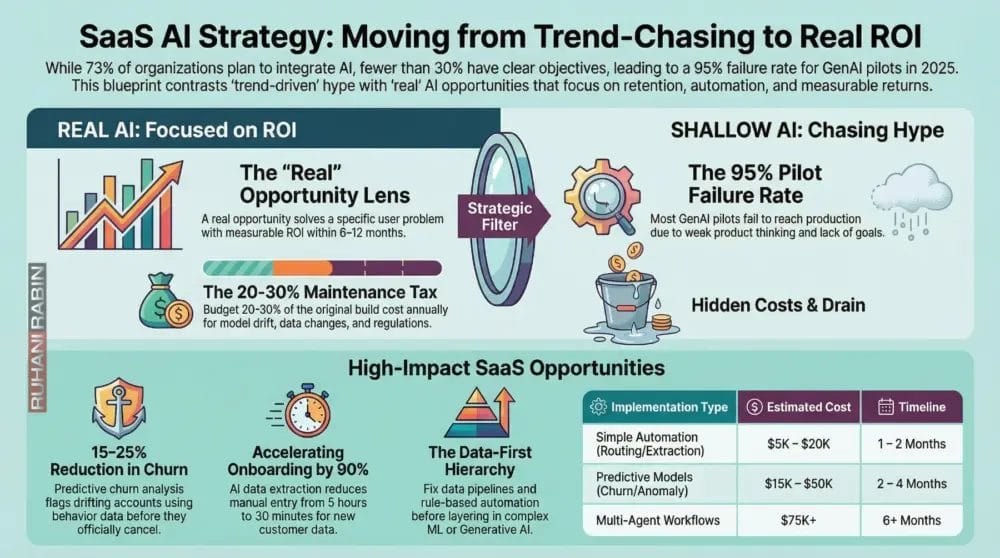
Seventy‑three percent of organizations say they plan to integrate AI or machine learning into their products. Fewer than 30 percent can point to clear business objectives or success metrics. Budgets go up while basic retention, onboarding, and support issues sit untouched.
After more than 25 years building SaaS for enterprises and working with many founders, I see the same pattern as documented in research on the AI revolution in SaaS platforms. Teams ship “AI‑powered” widgets because a competitor did, not because customers asked. They wrap a GPT API, add a chatbot, put it in the hero section, and hope investors are impressed. Then they wonder why churn is flat and support queues keep growing.
Analysts estimate that around 95 percent of GenAI pilots in large companies failed to reach production in 2025, burning tens of billions of dollars with no return. That is not an AI breakthrough. That is weak product thinking.
When I implement solutions for founders and mentor them through my brand Ruhani Rabin, it is all about clear thinking, simple products, and retention.
In this article, I walk through ten real automation and AI workflow opportunities with measurable ROI, and I contrast them with vanity features that quietly drain money. By the end, you will have a practical AI implementation strategy for SaaS products you can defend with numbers, not buzzwords.
“Without data, you’re just another person with an opinion.”
— W. Edwards Deming
What Makes An AI Opportunity “Real” vs. Trend-Driven

Before talking about use cases, you need a simple lens for deciding when to say yes to AI and when to walk away. Without that lens, every shiny demo looks “strategic.”
For me, a real AI opportunity:
- Solves a clear problem for a specific group of users
- Moves an important metric such as retention, activation, support cost, or conversion
- Would hurt if removed, because users depend on it
- Has an ROI you can estimate within 6–12 months in a spreadsheet
Trend‑driven work looks very different:
- AI is added because “everyone is doing AI now” or because an investor asked
- There is no success metric beyond vague “engagement”
- A simple rules‑based automation could do 80% of the job faster and cheaper
- Core UX problems stay broken while an “AI assistant” talks around them
When I evaluate any AI idea, I ask:
- What specific user problem does this solve?
If the answer sounds like a slogan (“make workflows smarter”), I drop it. A good answer sounds like “reduce time to create an invoice from 10 minutes to 1 minute for mid‑market finance teams.” - Which metric improves, and by how much?
“Reduce support cost per customer by 20% in six months” is a valid starting point. “Improve engagement” is not. - Can we solve this without AI?
If an if‑this‑then‑that rule, SQL script, or off‑the‑shelf automation gets most of the value, start there.
Another piece most teams skip is ongoing cost. Models drift, data changes, and regulations shift. As a rule of thumb, I tell founders to budget 20–30% of the original build cost per year to maintain any serious AI feature.
Wrapper features and generic chatbots are now commodities, as research on Artificial Intelligence as a Service shows the shift from generic solutions to strategic implementations. Your edge is not “we added AI.” Your edge is picking a few strategic automation opportunities that remove real friction and show clear payback.
“What gets measured gets managed.”
— Peter Drucker
With that context in place, let’s walk through ten areas where AI genuinely pulls its weight – and what the shallow version looks like in each case.
Real Opportunity #1 Predictive Churn Analysis
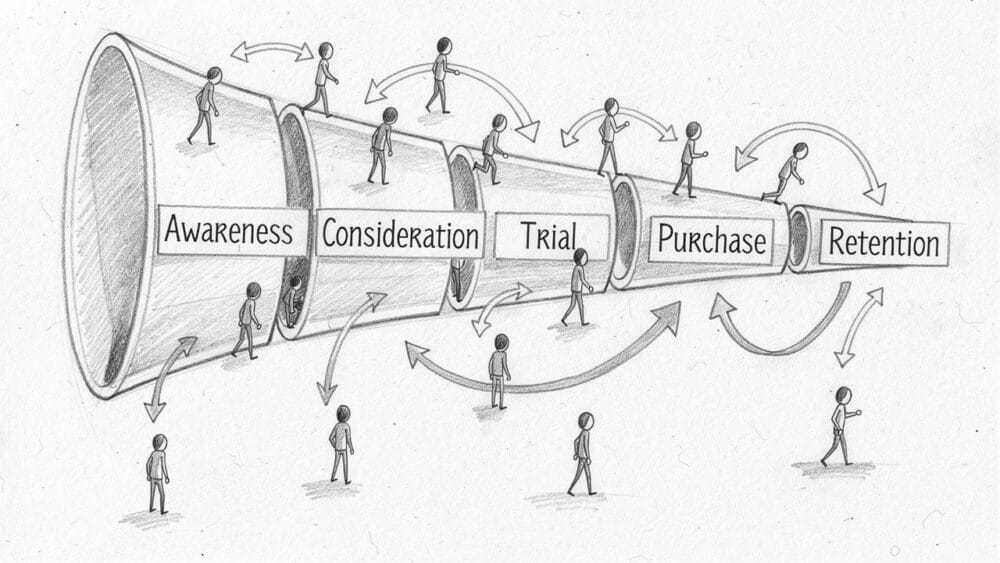
Churn is the slow leak that quietly kills SaaS companies. By the time a lost customer shows up in a dashboard, they have already mentally checked out.
Predictive churn analysis uses historical behavior to spot accounts that are drifting away while there is still time to act. A model can look at:
- Login frequency
- Key feature usage
- Support ticket sentiment
- Billing issues
It then scores each account for churn risk and triggers playbooks for customer success.
Once you have 6–12 months of clean event data and at least 50 churned accounts, this becomes very practical – especially for high‑value segments. Well‑run teams often see 15–25% churn reduction in target cohorts.
The real version:
- Ties directly to retention and revenue
- Integrates with CRM and success workflows
- Drives specific outreach (calls, offers, training)
The shallow version:
- Adds another “AI analytics” chart
- Flags nothing concrete
- Suggests no next steps
Do not touch this before product–market fit. After that point, predictive churn is often one of the first AI use cases worth funding.
Real Opportunity #2 Automated Customer Onboarding Data Extraction

Most B2B onboarding gets stuck on data. New customers hand over PDFs, spreadsheets, and email trails; your team spends hours cleaning and entering it.
With OCR and natural language models, you can:
- Extract key fields from messy inputs
- Normalize them to your schemas
- Validate and flag likely errors
Examples:
- Financial tools reading bank statements
- HR platforms processing employee lists
- Logistics products parsing shipping manifests
Instead of 2–5 hours per account, your team might spend 30 minutes reviewing edge cases. Onboarding drops from days to hours. Activation climbs because customers hit “aha” moments faster. Data errors fall sharply compared to rushed manual entry.
The real version goes straight at a measurable bottleneck: time‑to‑value and onboarding capacity.
The shallow version is an onboarding chatbot that answers questions but leaves the slow, error‑prone data work untouched.
To make this reliable, define schemas up front, design human fallbacks for the weird 20%, and respect privacy rules for everything you ingest.
Real Opportunity #3 Intelligent Revenue Recognition And Financial Forecasting
As SaaS billing gets more complex; usage‑based pricing, discounts, mid‑cycle changes – revenue recognition turns into a quiet headache. Spreadsheets crack, and finance loses evenings reconciling numbers.
AI can:
- Classify and track revenue streams in real time
- Predict cash flow and failed payments
- Generate accurate ARR and MRR forecasts
- Help align with standards like ASC 606 or IFRS 15
For companies around $1M ARR and above, this often saves 20–30 hours per month for finance. Catching even $50K/month of revenue leakage from failed charges can mean $600K/year recovered.
The real version:
- Integrates tightly with billing (e.g., Stripe, Chargebee) and accounting
- Documents logic for audits
- Improves forecast accuracy above 90%
The shallow version is an “AI finance dashboard” that just rearranges charts without automating recognition logic or predicting anything useful.
If your revenue is still simple, this is premature. Once closeout feels brittle and error‑prone, it moves up the list.
Real Opportunity #4 Context-Aware Support Ticket Routing And Prioritization
Support volume tends to grow in a straight line with customers. Manual triage becomes slow. Junior agents get tickets they cannot handle. High‑value accounts wait in the same queue as free users.
AI can read incoming tickets, detect intent and urgency, and combine that with context such as:
- Plan and ARR
- Customer tenure
- Past issues and sentiment
Instead of a single queue, you get smart routing:
- Enterprise or at‑risk accounts jump to the front
- Routine “how do I reset my password” questions go to self‑service
- Deep technical issues land with specialists
Average resolution time can drop by 40%, and escalations fall because tickets start with the right person.
The real version:
- Uses 3–6 months of tagged ticket history
- Lets humans override routing
- Keeps a clean path to a person from any automated surface
The shallow version is a generic chatbot that gives wrong answers and traps users with no escape. That just increases frustration and follow‑up work.
Real Opportunity #5 Personalized Feature Recommendations Based On User Behavior
As your product grows, most users learn only a small slice. Features you spent months building sit hidden.
AI‑driven feature recommendations solve the “I didn’t know this existed” problem. The system watches behavior and nudges people at the right moment:
- Heavy exporters get prompted to try scheduled exports
- Teams hitting sharing limits see advanced permissions
- Power users get surfaced higher‑tier features
Done well, this can:
- Increase adoption of secondary features by 25–35%
- Reduce churn (more value = more stickiness)
- Drive expansion MRR when people discover features that justify an upgrade
The real version:
- Uses solid event tracking and segmentation
- Respects context and timing (no spammy pop‑ups)
- Is tested with proper A/B experiments
The shallow version is a generic product tour that shows the same noisy prompts to everyone, which users immediately close.
Wait until you have at least 1,000 active users and stable product–market fit before you optimize at this layer.
Real Opportunity #6 Automated Anomaly Detection In Product Analytics
Most teams watch a handful of metrics: signups, active users, perhaps a main funnel. Yet the serious damage often hides in small patterns:
- A region suddenly struggling with performance
- A device type failing in onboarding
- A core feature breaking for one high‑value segment
Automated anomaly detection lets a model learn what “normal” looks like, then flag unusual shifts – across metrics, segments, and time.
Examples:
- A 20% drop in mobile onboarding for a week
- A spike in errors for a key feature used by your best cohort
- A sudden dip in payment success only in one country
Catching issues within days instead of weeks can protect tens or hundreds of thousands of dollars and a lot of user trust.
The real version:
- Starts with 3–5 core metrics (activation, core feature usage, payment success)
- Uses at least 6 months of stable event data
- Sends alerts that are specific and actionable
The shallow version slaps a chat interface on analytics and calls it “AI,” still relying on humans to notice problems and ask the right questions.
Real Opportunity #7 Dynamic Pricing Optimization For Usage-Based Models
Usage‑based pricing is powerful but tricky. If prices are too low, you leave money on the table. Too high, and people churn or underuse.
AI can help by:
- Analyzing usage patterns and payment history
- Estimating willingness to pay across segments
- Recommending tier thresholds and package changes
- Simulating how new prices affect ARR and churn
You might find:
- Underpriced power users who would accept a higher tier with more headroom
- Price‑sensitive segments that need simpler entry plans
Well‑designed systems often raise ARR by 10–15% through better alignment between price and value.
The real version:
- Works from detailed usage and revenue data
- Keeps pricing changes predictable and explainable
- Tests changes carefully before broad rollout
The shallow version is an “AI pricing engine” that just applies vague industry benchmarks and confuses customers with random‑feeling changes.
This makes sense when you already have complex or variable usage; if your model is simple seat‑based pricing, focus elsewhere first.
Real Opportunity #8 Automated Content Classification And Metadata Enrichment
If your product handles documents, media, or large data libraries, manual tagging breaks down fast. Search degrades, and content teams fall behind.
AI can:
- Read or view content
- Assign categories, topics, and keywords
- Flag quality or risk
- Support moderation workflows
Good fits include:
- Legal tech classifying contracts
- Digital asset tools tagging images
- Learning platforms organizing course material
When you automate first‑pass tagging:
- Teams can handle tens of thousands of items instead of hundreds
- Search quality improves
- Moderation and review focus on risky or high‑value items
The real version:
- Uses labeled examples to train
- Combines AI tagging with human review for edge cases
- Adapts as content types evolve
The shallow version is basic keyword matching dressed up as “AI,” which misses context and often creates noise.
Real Opportunity #9 Proactive Security And Compliance Monitoring
Security and compliance are easy to postpone – right up until something goes wrong. For SaaS products in regulated spaces or handling sensitive data, that delay can be very expensive.
AI can monitor:
- System logs and access patterns
- Permission changes and data exports
- Unusual login behaviors
It learns what normal looks like and flags:
- Suspicious large exports
- Permission creep
- Region‑specific anomalies
Benefits:
- Lower risk of breaches (average breach costs run into millions)
- Faster incident detection and response
- Easier prep for audits such as SOC 2, GDPR, or HIPAA
The real version:
- Taps detailed logs
- Integrates with incident response processes
- Organizes audit evidence continuously
The shallow version is a static rule engine with “AI” on the label that still needs constant manual tuning and misses new patterns.
For SaaS in finance, healthcare, or enterprise, this is a serious risk and revenue protection play, not just an efficiency tweak.
Real Opportunity #10 Intelligent Workflow Automation Using Multi-Agent Systems
Many real‑world workflows cross multiple tools, teams, and exceptions. Traditional automation works until branching logic gets messy, then breaks.
Multi‑agent AI systems assign different specialized agents to each part of a process:
- One agent extracts and validates data
- Another runs scoring or risk models
- Another applies policy rules
- Another handles approvals or communications
Example: a loan‑like approval flow or complex enterprise onboarding:
- Agent A reads documents and extracts fields
- Agent B runs credit or risk checks
- Agent C applies region and product rules
- Agent D prepares a summary for a human approver or auto‑approves low‑risk cases
When this works, processes that used to take days drop to hours, with 80–90% of cases handled without human input. Throughput can climb by 10x without a similar jump in headcount.
The real version:
- Sits on top of solid data, APIs, and monitoring
- Starts with one expensive, stable workflow
- Has clear human overrides and error handling
The shallow version is a “multi‑agent demo” with no production‑grade reliability, bolted onto weak data foundations.
Treat this as a 12–36 month horizon item. Nail simpler opportunities – like churn prediction and onboarding extraction – before you attempt this.
The AI Traps To Avoid (And What To Do Instead)
Once teams hear “AI,” certain patterns repeat. Here are the ones that waste the most time and money when people plan their AI implementation strategy for SaaS products.
Trap #1 The Generic Chatbot As Primary AI Strategy
Many teams start and end with a generic chatbot on the homepage. It can answer a few questions from help docs and looks good in a demo, but it rarely fixes real problems.
Issues:
- Wrong or outdated answers
- No clean escalation to humans
- No measurable improvement in support or activation
Instead, use AI to support specific workflows:
- Smart routing
- Suggesting the right knowledge base article
- Gathering context before a human takes over
If your “AI strategy” equals “add a chatbot,” you have a UX and documentation problem, not an AI opportunity.
Trap #2 Building On GPT Wrappers For Core Features
Another pattern is shipping core product value as a thin UI on top of a third‑party model API. It feels fast – until:
- Competitors copy you in days
- The provider changes pricing or limits
- Token costs eat your margins
Use general models for non‑differentiating tasks (spell‑check, summarization, generic extraction). For what makes your product special, invest in deeper integrations, your own data pipelines, or custom models.
A healthy pattern:
- Start with a wrapper to learn
- Validate product–market fit for the AI feature
- Gradually move critical pieces toward more owned approaches
Trap #3 Adding AI Without Defined Success Metrics
Features scoped around “delighting users” or “modernizing the experience” with no numbers attached are almost guaranteed waste. They ship, nobody knows if they work, and nobody wants to remove them because they look impressive.
Before starting any AI work, write down one primary metric and a target:
- “Reduce support cost per customer by 20% in six months”
- “Increase activation rate by 10% for new signups”
If you cannot agree on a metric, the feature is not ready. If you ship and see no movement within 90 days, be ready to kill or redesign it.
Trap #4 AI Before Fixing Basic UX Friction
Teams often drop AI on top of confusing workflows. They hope an assistant can explain weird steps instead of redesigning them.
Users do not want help using a broken flow. They want a better flow.
Fix first:
- Onboarding clarity
- Navigation and copy
- Load times and error messaging
Then add AI to handle genuine edge cases or personalization. Most churn comes from confusion, not from a lack of AI.
Trap #5 Prioritizing AI Over Data Infrastructure
Every useful AI use case depends on good data. Yet teams still chase models while:
- Event tracking is inconsistent
- Key fields are missing
- Histories are short or unreliable
Models trained on messy data produce messy outputs. People lose trust, and projects stall.
The order that works:
- Fix data pipelines and tracking
- Add simple rule‑based automation
- Layer in ML where there is a clear case
- Only then consider generative and multi‑agent setups
It is not glamorous, but teams that invest in clean data win over time.
How To Prioritize AI Opportunities For Your SaaS Product
You cannot build all ten at once. A good AI feature prioritization process starts from your current reality.
Start With Your Current Bottlenecks, Not AI Trends
List where:
- Your team spends the most time
- Customers get stuck
- Costs grow linearly with revenue
Map those pain points to the ten opportunities:
- Big churn issues → predictive churn and anomaly detection
- Slow onboarding → data extraction and workflow automation
- Overloaded support → ticket routing and better self‑service
Score each candidate on impact (revenue, cost, risk) and feasibility (data readiness, skills, time). Prioritize high‑impact, medium‑or‑better feasibility.
The Product Archetype Filtering Approach
Consider your product’s core shape:
- Application‑focused: Users live in your UI. Best fits: onboarding extraction, feature recommendations, content classification.
- Data‑as‑a‑platform: You provide access to rich data. Best fits: anomaly detection, forecasting, compliance monitoring.
- Analytics‑focused: You sell insights. Best fits: churn prediction, pricing optimization, anomaly detection.
This filter keeps you from chasing use cases that do not match your product’s strengths.
Apply The Build Vs. Buy Decision Framework
- For narrow, well‑known problems (support routing, basic churn scoring), favor buying or customizing existing tools.
- For differentiating experiences that rely on your special data or workflow, consider building more custom approaches.
Often the best path:
- Start with pre‑built tools to prove value
- Move to deeper customization only if the limits of those tools block clear ROI
Sequence Your Implementation Based On Data Readiness
Rough order:
- Foundational automation (onboarding extraction, support routing, content tagging) – needs clear rules and modest history
- Predictive work (churn models, recommendations, anomaly detection) – needs 6–12 months of stable data
- Advanced projects (pricing optimization, compliance monitoring, multi‑agent workflows) – need strong data, processes, and skills
Trying step 3 before steps 1 and 2 is a fast way to lose time and trust.
Calculate Break-Even Timelines
For each idea:
- Estimate full implementation cost (people, tools, time)
- Estimate monthly benefit (time saved, revenue added or protected)
- Divide cost by monthly benefit → payback period
Focus on projects with break‑even under 6–12 months, especially if your product or market is still changing.
Measuring AI ROI The Metrics That Actually Matter
If you cannot measure AI’s impact, you are guessing. Fancy charts mean little when budgets tighten.
Why Generic “AI Adoption” Metrics Are Meaningless
“Number of AI features” or “minutes spent in the AI assistant” tell you almost nothing about business value. They are fine for internal diagnostics but not for deciding whether to keep investing.
For AI to earn a place on your roadmap, it must either:
- Help you make money
- Help you save money
- Improve quality or risk in ways you can quantify
The Three Categories Of AI ROI Metrics
Think in three buckets:
- Efficiency
- Hours saved on data entry, support triage, reconciliation
- Lower cost per ticket, customer, or transaction
- Revenue impact
- Reduced churn and the revenue protected
- Higher conversion rates
- Expansion revenue from better feature discovery or pricing
- Quality
- Faster resolution times
- Higher satisfaction scores
- Lower error rates in data or compliance
Track Both Leading And Lagging Indicators
You need:
- Leading indicators (30–60 days): model accuracy, prediction coverage, feature usage
- Lagging indicators (90–180 days): churn, revenue, cost per unit, NPS
Expect a lag before top‑line numbers move, and plan for it in your reviews.
Set 30/60/90 Day Check-Ins
For every AI feature:
- Day 30: Is it being used? Are outputs sane?
- Day 60: Are leading indicators trending the right way?
- Day 90: Is the core business metric moving?
If nothing meaningful shifts by day 90, adjust or remove the feature. This keeps your AI implementation strategy for SaaS products honest.
My Standard If You Can’t Measure It, Don’t Build It
Every AI feature should ship with one primary metric and a target range. “Better user experience” without a measurable proxy usually means “we do not know why we are building this.”
If you cannot define what “good” looks like in numbers, you are not ready to build.
Common Mistakes I See Teams Make (And How To Avoid Them)
Patterns repeat. After decades in product and AI consulting, I can predict some failures before the first line of code.
Mistake #1 Skipping The “Why” And Jumping To “How”
Teams ask which stack to pick or whether to fine‑tune a model before they can state the problem in one sentence. That leads to features hunting for use cases.
Fix it by forcing every AI conversation to start with:
- What user problem are we solving?
- Which metric will move, and by how much?
If you cannot answer simply, you are not ready.
Mistake #2 Ignoring Data Quality Until After Building The Model
Building clever models on dirty data wastes months and burns trust. Stakeholders conclude that “AI does not work here.”
Do a data audit first:
- Check completeness and consistency
- Confirm at least 6 months of relevant history
- Make sure key events are defined and tracked
Mistake #3 Over-Customization On Insufficient Data
Fine‑tuning sounds impressive, but tuning on a few hundred examples often hurts performance. You end up maintaining a custom model that is worse than a base model.
Better approach:
- Use strong general models
- Ground them on your data (e.g., retrieval over your docs)
- Only fine‑tune once you have thousands of high‑quality examples and a clear gap to close
Mistake #4 Automating Bad Processes Instead Of Fixing Them
Speeding up a broken approval or onboarding process just helps you make bad decisions faster.
Sequence that works:
- Simplify the process
- Remove unnecessary steps
- Automate what remains
- Apply AI only where pattern recognition or prediction truly helps
Mistake #5 No Human-In-The-Loop For High-Stakes Decisions
Letting AI auto‑decide prices, downgrades, or risk flags without review can hurt valuable customers or trigger compliance problems.
For anything tied to money, access, or trust:
- Have AI recommend, humans approve or adjust
- Set confidence thresholds
- Keep override paths easy to use
Mistake #6 Building Without Clear Escalation Paths
Even good AI fails on some inputs. If there is no escape hatch, users feel trapped.
Design escalation before launch:
- From chatbots to humans
- From auto‑decisions to review queues
- From failed automation back to manual processes
When users know they can get help if something feels wrong, they accept AI more easily.
Building AI Implementation Into Your Product Strategy (My Framework)
AI should not sit in its own corner. It has to be part of the product strategy, not a parallel track. Here is the structure I use when I work with founders through Ruhani Rabin.
Step 1 Establish AI Principles At Leadership Level
Leadership should decide:
- Are we AI‑native (intelligence is core value) or AI‑augmented (AI improves existing workflows)?
- Where is AI allowed to act fully automatically, and where must humans stay in the loop?
- How does AI support our moat, rather than making us easier to copy?
Assign a senior owner who can say no to trendy projects that do not fit.
Step 2 Map AI Opportunities To Your Product Lifecycle
Timing matters:
- Before product–market fit: Limit AI to small internal experiments and noncritical touches. Your main job is validating core value.
- During scaling: Automate workflows you understand (onboarding, support, reporting). Target known metrics.
- In maturity: Use more advanced AI (deep personalization, multi‑agent workflows) to improve unit economics and defend your position.
Step 3 Build Foundational Capabilities Before Advanced Features
Sequence that works:
- Clean data and reliable event tracking
- Simple automation (rules, scripts, workflows)
- Traditional ML (scoring, prediction)
- Generative AI where text or content matters
- Multi‑agent orchestration for complex processes
Skipping ahead means debugging data and models at the same time – painful and slow.
Step 4 Integrate AI Governance From Day One
Decide:
- Who owns each model across its life cycle
- How you monitor performance and drift
- How you handle bias, transparency, and human overrides
Budget 20–30% per year of the initial build cost for model maintenance, retraining, and evaluation.
Step 5 Make AI A Cross-Functional Capability, Not a Silo
A small center‑of‑excellence can:
- Set patterns and guidance
- Support product, design, and operations
- Help teams pick the right tools
At the same time, PMs, designers, and operators should understand AI basics so they can spot real opportunities and limits.
Step 6 Define AI Success Criteria That Mirror Product Success Criteria
AI work should share the same north star as your product:
- If retention is your core goal, AI should help people stay longer.
- If expansion is key, AI should surface and support upsell paths.
Avoid separate AI scorecards built on soft measures like “assistant usage.” Everything should line up with the same metrics the rest of the product uses.
In practice, review AI work every quarter, kill or pause what does not fit, and keep AI items in the same roadmap as the rest of the product.
When AI Isn’t The Answer (And What To Do Instead)
A healthy AI implementation strategy for SaaS products includes knowing when not to use AI. Saying no often saves more value than saying yes.
When Basic Automation Is Sufficient
Some tasks are repetitive with clear rules:
- Invoice creation
- Notification emails
- Simple data exports
- Standard reminders
Workflow tools or scripts often handle these for tens of dollars per month, instead of thousands in AI spend. Use AI only when rules break down or pattern recognition is genuinely needed.
When Your Data Isn’t Ready
If your data is incomplete, inconsistent, or scattered, models cannot rescue it.
Red flags:
- Event tracking differs by environment
- Key events were added only recently
- Less than 6 months of relevant history
Spend 3–6 months instrumenting and cleaning. Then revisit AI when you can export clean data for your target metric without manual fixes.
When The Problem Is Actually UX Design
AI is often used as a bandage for poor design. A chatbot cannot make confusing navigation or copy clear.
Fix:
- Information architecture
- Screen layout and hierarchy
- Copy and error messages
Then offer AI as optional help, not a crutch.
When You Haven’t Validated The Manual Process
Automating a process you have never run manually is risky. You do not know real edge cases, expectations, or timings.
First:
- Run the process with a small group manually
- Document steps and pain points
- Refine until outcomes are good
Only then automate; and add AI – around a process you understand.
When ROI Timeline Exceeds Business Uncertainty
Some AI ideas have a payback period of 2+ years. For a young or pivot‑prone product, that is longer than your strategic horizon.
If a feature will not pay back in under 12–18 months, ask hard questions:
- Are there simpler improvements with faster payback?
- Are we ignoring basic product work that matters more?
Early on, survival and product–market fit beat sophistication.
My Default Position Fix The Obvious First
In almost every review, I see obvious issues ahead of AI:
- Slow pages
- Confusing copy
- Weak onboarding
- Unclear pricing
AI comes after those basics. If users leave because they do not understand or trust your product, no model can save you.
Conclusion
There are at least ten real AI opportunities where thoughtful work can add serious, measurable value to a SaaS product. Most teams, however, spend resources on trend‑driven ideas that look impressive but do not move the numbers.
Real AI work:
- Starts with problems, not models
- Is driven by metrics, not vanity
- Respects data quality, team capacity, and runway
- Has the discipline to retire features that do not pay their way
I understand the pressure from investors, boards, and competitors. Everyone wants to talk about how “AI‑powered” their product is. The companies that benefit are the ones that keep their discipline under that pressure.
Remember: while 73% of organizations plan to integrate AI, only those with clear objectives, clean data, and strong follow‑through will see strong returns. In my experience, teams that focus on solving real, measurable problems win. Teams that chase technology trends for their own sake burn time, money, and trust.
Specific Next Steps For Readers
- Audit current AI features. For each, write down the user problem and target metric. If you cannot, freeze or consider removing it.
- Pick two opportunities from this article that map directly to your biggest bottlenecks (churn, onboarding, support cost, pricing, compliance). Avoid spreading across more than three.
- Sketch a simple ROI model for each: total cost vs. monthly benefit. If payback is beyond 12 months, move it down the list for now.
- If you are early or unsure where to start, begin with predictive churn or support routing. Their patterns are well understood, data needs are manageable, and impact is easier to measure.
Most SaaS products do not need more AI features. They need clearer products, faster paths to value, and less friction. Sometimes that includes AI. Most of the time, it starts with basics.
FAQs
Question 1 How Do I Know If My SaaS Product Is Ready For AI Implementation?
You are ready when:
- Product–market fit feels stable (retention cohorts hold, users return without heavy pushing)
- You have at least 6 months of clean user data with consistent event tracking
- You can point to a specific operational bottleneck that costs real time or money (slow onboarding, rising support load, messy reporting)
You are not ready if:
- You are still guessing about core value
- Users churn mainly from confusion
- Your data requires heavy manual cleanup before analysis
A good rule: if you cannot run the process you want to automate manually and reliably, you are not ready to automate it with AI.
Question 2 What’s The Minimum Budget For Implementing One Of These AI Opportunities?
Ballpark ranges:
- Simpler automation (onboarding extraction, support routing, content tagging):
- Roughly $5K–$20K
- Using pre‑built tools and APIs
- Timelines of 1–2 months
- Predictive models (churn, recommendations, anomaly detection):
- Roughly $15K–$50K
- Includes data cleaning, training, evaluation
- Timelines of 2–4 months
- More complex efforts (revenue recognition, pricing optimization, compliance monitoring):
- Roughly $30K–$100K
- Timelines of 3–6 months
- Multi‑agent workflows:
- Start around $75K+ and can exceed $200K
- Timelines of 6+ months
Roughly, expect ~40% of cost in engineering, 30% in data/infrastructure, 20% in testing, 10% in monitoring setup. Start with lower‑cost projects to prove value before committing to larger ones.
Question 3 Should I Build Custom AI Models Or Use Pre-Built Options?
For most teams and most cases, pre‑built or lightly customized models are the right starting point:
- Common problems (churn scoring, ticket routing, document extraction) already have strong tools
- They get you to market faster with less risk
- They avoid hiring large specialist teams early
Consider more custom models when:
- The AI feature is central to your differentiation
- Off‑the‑shelf tools clearly fail for your domain
- You have enough proprietary data to train something meaningfully better
A pragmatic pattern:
- Start with pre‑built models and good grounding on your data
- Validate that the use case brings value
- Move to heavier customization only if general tools are the limiting factor
Question 4 How Long Does It Take To See ROI From AI Implementation?
Typical timelines:
- 30–60 days: Check leading indicators (model accuracy, coverage, feature usage).
- 60–90 days: See operational shifts (hours saved per week, lower support or finance workload).
- 90–180 days: See business outcomes (churn, revenue, unit economics).
For predictive analytics like churn or anomaly detection, expect 3–4 months to measure impact. For complex work like pricing or compliance, 6–9 months is more realistic.
If your payback model shows more than 18 months, consider whether this is the best use of resources right now. I expect any serious AI feature to move at least one target metric within 90 days of launch.
Question 5 What Data Do I Need Before Starting An AI Project?
You need enough history, quality, and structure:
- History:
- Usually 6–12 months of relevant data
- Quality:
- Around 80%+ completeness and accuracy
- Clear schemas and shared definitions
- Volume (examples):
- Churn prediction: at least 50 churned accounts
- Personalization: ideally 1,000+ active users
- Supervised learning: 10–20% of data labeled with correct outcomes
Infrastructure basics:
- Consistent event tracking (Mixpanel, similar tools, or custom pipelines)
- A warehouse such as BigQuery, Redshift, or a comparable system
- Clear ownership for tables and fields
Quick test: if you cannot export clean data for your target metric without manual cleanup, fix instrumentation before serious AI work.
Question 6 How Do I Convince Leadership To Invest In AI (Or Stop Wasting Money On It)?
To make a case for investment:
- Quantify current pain (time spent, error rates, churn, revenue at risk)
- Show a small, focused project that addresses part of that gap
- Present a simple payback model (cost vs. monthly benefit)
- Ask for budget for a constrained proof of concept, not a massive program
To reduce wasteful AI spending:
- Audit current initiatives and ask which metric each one has improved
- For weak candidates, show opportunity cost: what that budget could do for UX fixes or high‑impact automation
- Frame AI as a tool to use where it has clear ROI, not where it flatters slide decks
Concrete numbers and side‑by‑side comparisons land better than broad arguments for or against AI.
Question 7 What Happens If The AI Makes A Mistake?
All AI systems make mistakes. The key is managing impact and detectability.
Ways to reduce risk:
- Set confidence thresholds and only auto‑act on high‑confidence cases
- Route low‑confidence or high‑impact cases to humans
- Design human‑in‑the‑loop workflows for pricing, access, and risk decisions
- Monitor error rates and anomaly alerts on a dashboard
- Keep a way to revert to manual processes if something goes wrong
Think of it like insurance: the cost and frequency of AI mistakes must stay lower than the cost and risk of doing everything manually.
Question 8 Can Small SaaS Companies (Under $1M ARR) Benefit From AI?
Yes – but small teams have to be far more selective.
Good early candidates:
- Onboarding data extraction to avoid drowning in manual setup as new customers arrive
- Smarter support routing or AI‑assisted help desks to keep support lean
- Pre‑built AI features in tools you already use (CRM, analytics, help desk)
What I would avoid under $1M ARR:
- Custom model builds
- Complex pricing optimization
- Heavy compliance monitoring
- Multi‑agent workflow systems
Before $1M ARR, your priority is:
- Clear product value
- Happy early customers
- Simple automation that saves obvious time
- Only then, selective AI for well‑understood use cases
Use AI where it removes clear friction; skip it where it distracts from finding and strengthening product–market fit.