
Top 22 Free Tools to Transform Your Windows 11 Experience
Discover the top 22 free tools to elevate your Windows 11 experience. Boost productivity and simplify your daily tasks today!
Are you ready to make your Windows 11 experience even better—for free?
There are many fantastic free tools that can help you increase productivity and customize your computer. From software that improves performance to apps that make file management easier, there’s something for everyone.
In this post, I will share 22 fantastic free tools that can transform how you use Windows 11. These tools are not only helpful but also fun to explore. Let’s jump in and find out how these tools can improve your daily tasks and make your computer experience more enjoyable! You can check this page if you are also looking for Windows 11 customizing tools.
1. FastStone Image Viewer (Easy Photo Viewing)

FastStone Image Viewer is a necessary tool for digital photography enthusiasts. More than just a basic photo viewer, it delivers a strong image editing and management solution. With this software, you can quickly view, convert, and edit images. The initial time I used it, I was impressed by how effortlessly I could organize my photos!
This user-friendly application supports a wide range of formats, including BMP, JPEG, PNG, and RAW files from digital cameras. You can easily resize, crop, and add annotations to your images. Plus, it boasts an impressive slideshow creation tool with over 150 transition effects, ensuring your presentations are visually interesting.
A standout feature is the full-screen mode, which offers quick access to necessary information without cluttering your screen. If you seek a tool that enhances your productivity and simplifies photo management, FastStone is a must-try. Explore more about free portable software options to lift your Windows 11 experience.
FastStone Image Viewer is a lightweight application that excels in photo organization and editing. If you’re a beginner or a pro, it’s a valuable addition to your toolkit!
2. PeaZip for Windows: The All-in-One Archive Manager

PeaZip is a free and open-source archive manager for Windows that handles far more than basic ZIP files. It can open and extract more than 200 archive formats, including ZIP, 7Z, RAR, TAR, ISO, CAB, ZIPX, GZIP, XZ, Zstandard, and many others. This makes it a practical replacement for juggling several compression and extraction tools.
I find PeaZip particularly useful when working with unfamiliar archive formats or large collections of files. You can create new archives, browse their contents without extracting everything, convert archives between supported formats, split large files into smaller volumes, and securely delete sensitive files when they are no longer required. Its Windows context-menu integration also lets you compress or extract files directly from File Explorer.
Security is another area where PeaZip goes beyond standard Windows compression. It supports strong encryption, encrypted password management, checksum and hash verification, two-factor authentication for supported archives, and secure file deletion. These features are useful when sharing confidential documents, verifying downloaded files, or storing backups that should not be accessible without authorization.
PeaZip also works as a capable file manager. It includes bookmarks, file searching, content filtering, duplicate-file detection, image and text previews, and tools for calculating checksums. There is also a portable Windows edition that runs without installation, making it useful for USB drives, temporary systems, and computers where you do not want to modify the installed software.
Unlike many free compression utilities, PeaZip does not rely on advertising or bundled unwanted software. It provides a clean, flexible interface backed by established open-source technologies such as 7-Zip, Brotli, FreeArc, and Zstandard. For Windows users who want one dependable application for compression, extraction, encryption, archive conversion, and basic file management, PeaZip is one of the strongest free options available.
3. UniGetUI (Modern App Manager for Windows)
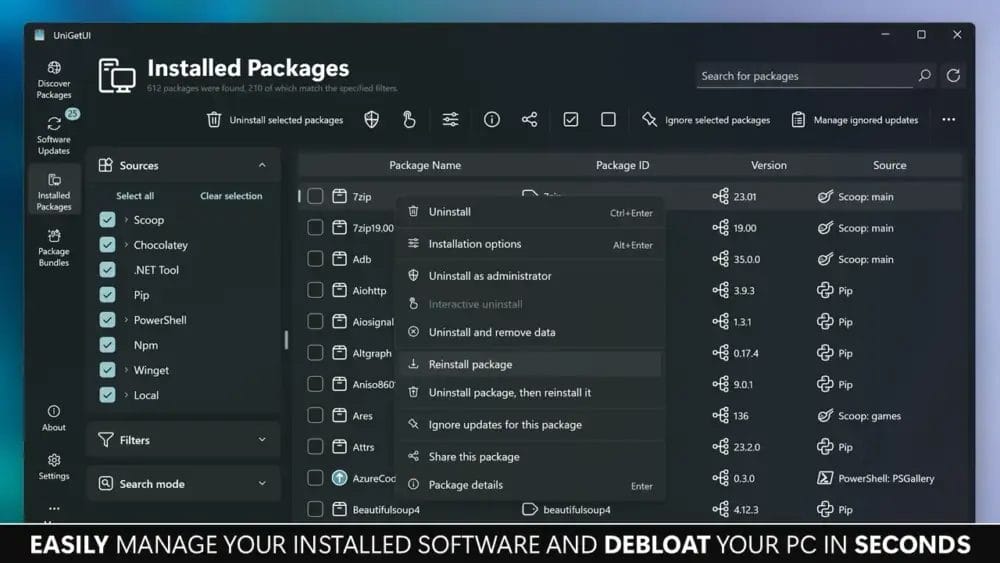
This utility became so useful that I keep it running in the system tray. The UniGetUI interface displays a clean, organized window where you can browse software, view details, and manage installations with simple buttons. Categories, search results, and package information are neatly arranged, making it easy to find what you need without digging through menus.
UniGetUI is a lightweight, user‑friendly tool that brings multiple Windows package managers – like Winget, Scoop, Chocolatey, Pip, and more – into one unified graphical interface. Instead of typing commands, you get a smooth, intuitive dashboard where you can install, update, or remove apps with just a click.
A standout feature is bulk management. You can select several apps at once and install or update them together, which is incredibly helpful when setting up a new PC or refreshing an existing one. It also supports exporting and importing package lists, making it simple to recreate your setup on another machine.
UniGetUI can notify you when updates are available or automatically keep your software up to date. This helps maintain a secure and efficient system without constant manual checks.
In the end, UniGetUI is a practical and powerful tool for anyone who wants easier control over software installation and updates on Windows. Its clean design, wide compatibility, and time‑saving features make it a valuable addition to your productivity toolkit.
4. Windows Update Blocker (Disable Windows 11 Auto Update Permanently)

Windows Update Blocker is a free, open-source tool that allows you to permanently disable automatic updates on your Windows 11 system. Say farewell to unexpected restarts during gaming or significant projects! This powerful software creates a registry key that stops the Windows Update service, ensuring your computer won’t check for or install updates without your permission.
Using Windows Update Blocker is straightforward. You can choose between the graphical user interface (GUI) or the command-line interface (CLI). Follow these simple steps:
Managing updates is necessary. While disabling them can improve system performance, be cautious—you might miss critical security patches.
To download Windows Update Blocker, visit this link. Take control of your updates and lift your Windows 11 experience for a more tailored computing journey.
5. LibreOffice (Feature-Rich Alternative to MS Office Suite)

LibreOffice is a feature-rich alternative to Microsoft Office, and it’s completely free! This open-source software suite is perfect for Windows 11 users, offering necessary tools like Writer for documents, Calc for spreadsheets, and Impress for presentations. Create stunning presentations for school or work without spending a dime!
A standout feature of LibreOffice is its compatibility with Microsoft Office files. Effortlessly open, edit, and save documents in formats like .docx and .xlsx, ensuring you won’t lose significant work when switching between programs. It also supports the Open Document Format (ODF), giving you greater control over your files.
With a wide array of templates and extensions, you can customize your experience to meet your needs. If you need help with graphic design or data analysis, there’s an extension available. The active community behind LibreOffice ensures support is always within reach.
If you’re looking for a powerful, free tool to increase your productivity, LibreOffice is the ideal choice. It’s not just software; it’s a community-driven solution that empowers you to create and collaborate effectively. One of the standout features of LibreOffice is the ability to simplify tasks like copying text from scanned documents. This functionality makes it easier to extract and repurpose information without extensive manual editing. As a result, users can significantly streamline their workflow and enhance their overall productivity.
6. ShareX (Take, Edit, Upload Screenshot)

ShareX is a powerful, free, and open-source tool designed for Windows 11 users who want to capture, edit, and share screenshots effortlessly. If you’re gaming or working on a project, you can instantly snap a screenshot using a customizable hotkey.
What sets ShareX apart is its extensive image editing capabilities. After capturing a screenshot, you can easily:
Add Annotations: Highlight significant areas with arrows or text.
Apply Effects: Add blur or erase specific sections of the image.
Create GIFs: Convert your screen recordings into dynamic animations.
Sharing your edited screenshots is a breeze. Upload them directly to cloud storage or share via links, transforming ShareX into a complete productivity software solution for managing your digital content.
In a world filled with complex system utilities, ShareX stands out as a necessary tool for enhancing your Windows 11 experience.
7. OBS Studio (Record Screen or Go Live)

OBS Studio is a powerful, free and open-source software that transforms screen recording and live-streaming. If you’re showcasing gaming skills or creating engaging tutorials, OBS simplifies the process. This versatile tool captures video from your screen, webcam, or capture card, delivering high-quality video production.
A standout feature is its ability to merge multiple sources into one video. You can overlay text, images, and browser windows, enhancing your content’s visual appeal. For live-streaming, OBS enables seamless broadcasting to platforms like Twitch and YouTube, allowing real-time audience connection without lag.
Furthermore, you can adjust settings like bitrate and resolution, optimizing your output for any device. If you’re an aspiring multimedia creator or simply want to share your interests, OBS Studio is the ultimate tool for smooth screen recording and livestreaming.
8. Davinci Resolve (Pro Level Video Editor for Free on Windows 11)

DaVinci Resolve is a free, professional-level video editing software for Windows 11. Perfect for budding creators, it empowers you to craft stunning videos at no cost. With advanced features like color grading, audio post-production, and visual effects, you can achieve high-quality video production.
This software’s non-linear editing system allows you to edit clips in any order, giving you ultimate flexibility and control. Manage your media effortlessly, design motion graphics, and edit in 4K resolution. Its intuitive interface makes navigation easy, even for beginners.
Moreover, DaVinci Resolve offers collaboration features, enabling you to work on projects with friends or classmates. A wealth of tutorials is available online to help you master the software. If you’re excited about video editing, this tool is a fantastic option!
9. VLC Media Player (Play Any Type of Videos)

VLC Media Player is a powerful, open-source multimedia player that effortlessly handles nearly every video and audio format. If you’re enjoying a blockbuster movie or exploring rare music tracks, VLC is your go-to tool, ready to play everything from high-definition videos to niche audio files.
What makes VLC stand out?
Here are its key features:
- Cross-platform: Works seamlessly on Windows 11, Mac, and mobile devices.
- Extensive codec support: Plays nearly all video formats without needing extra downloads.
- Screen recording: Effortlessly capture your screen or webcam.
- Customizable interface: Tailor VLC’s appearance to fit your personal style.
- Subtitle support: Easily add subtitles to improve your viewing experience.
VLC also enables file conversion, making it a necessary tool for file management. Need to share a video in a specific format?
Convert it quickly with VLC!
VLC Media Player is a user-friendly, lightweight application that elevates your Windows 11 experience. More than just a player, it’s a complete multimedia solution for today and the future!
10. BitWarden (Best Free Password Manager, Works Across All Your Platforms)

Managing multiple passwords can be overwhelming, but Bitwarden makes it easy. As the top free password manager, it’s particularly advantageous for Windows 11 users. With Bitwarden, you can securely store, manage, and share sensitive information, including passwords and credit card details.
What makes Bitwarden stand out?
It’s open-source, allowing anyone to inspect its security code. This password manager works seamlessly across nearly every platform, from web browsers to desktop applications, ensuring your passwords sync effortlessly across all devices.
Key features include:
- Password Generator: Create strong, unique passwords for each account.
- Two-Factor Authentication: Add an extra layer of security with additional verification.
- Secure Storage: Keep all your sensitive information in one safe place.
Using Bitwarden enhances your cybersecurity and improves productivity by simplifying application management. It’s an indispensable tool for anyone looking to safeguard their digital life.
11. Uninstalr (Remove Programs and Cleanup Windows 11)

Managing applications on Windows 11 can be overwhelming, but Uninstalr makes it easy. This free tool is a must-have for anyone wanting to remove programs and improve system performance.
Uninstalr shines in its ability to batch uninstall multiple apps at once, saving you precious time. It performs a thorough analysis of each application, ensuring no leftover files remain. Imagine it as a deep clean—like uncovering all those hidden toys under your bed!
- User-Friendly: Its intuitive interface ensures easy navigation.
- Wide Compatibility: Seamlessly works with Windows 11, 10, 8, and 7.
- Lightweight: It won’t slow down your computer.
Furthermore, Uninstalr includes a sleek Dark Mode for a modern look. With this tool, you gain full control over your software management, acting as a personal assistant to keep your computer clean and organized.
12. Free Download Manager, or FDM (Download Manager for Windows 11)

The Free Download Manager (FDM) is a must-have for Windows 11 users. This strong tool can accelerate your downloads by up to 600%, enabling you to quickly obtain your favorite games and videos. As open-source software, FDM efficiently manages multiple downloads at once, testing your files organized and easily accessible.
With features like download scheduling, bandwidth management, and the ability to resume interrupted downloads, FDM adapts to your needs. It supports different protocols, including HTTP, HTTPS, and BitTorrent, making it versatile for all your downloading tasks. Its user-friendly interface makes sure that even beginners can steer it effortlessly.
Key features include:
- Download Acceleration: Boosts download speeds remarkably.
- File Organization: Automatically sorts files for quick access.
- Download Scheduler: Lets you set specific times for downloads to start.
If you’re downloading software, music, or videos, FDM enhances your Windows experience, making downloads fast, efficient, and hassle-free.
13. Windows 11 Tweaks Tool (Advanced Tweaking for Windows 11)

Improve your Windows 11 experience with Ultimate Windows Tweaker 5, a powerful and free tool for advanced system tweaking. This tool effortlessly boosts your system’s performance and customization. There are more than 200 system tweaks available.
Its intuitive interface simplifies navigation through key categories like system information, user accounts, and privacy settings. Here’s what makes it exceptional:
Performance Optimization: Adjust settings to speed up your computer.
User Interface Customization: Tailor themes and layouts to match your style.
System Cleanup: Remove unnecessary files to improve performance.
To get started, download the UWT5.zip file, extract it, and double-click the .exe file. In just minutes, you’ll experience a more efficient and personalized Windows 11.
If you’re fine-tuning File Explorer settings or managing startup programs, this tool is perfect for anyone looking to optimize productivity with Windows applications.
14. HandBrake (Free Video Converter on Windows 11)

HandBrake is a powerful free video converter for Windows 11. This open-source software excels at converting videos into different formats. If you have a favorite movie in an incompatible format, HandBrake can transform it into .MP4 or .MKV, ensuring compatibility with nearly any device.
What makes HandBrake stand out is its user-friendly interface. You can quickly choose a preset designed for your device or look at advanced settings to fine-tune video quality. Plus, its batch processing feature allows you to convert multiple files at once, saving you precious time!
Key features include:
- Format Support: Works with different video formats, including AVI and MOV.
- Encoding Options: Choose from multiple video encoders like H.264 and H.265.
- Subtitles: Easily add subtitles to improve your viewing experience.
HandBrake is more than just a tool; it’s your gateway to endless digital media enjoyment. Download it today and transform how you watch videos!
15. Sumatra PDF (Fastest Free PDF Reader on Windows 11)

Searching for a fast and free PDF reader for Windows 11?
Find Sumatra PDF. This open-source software is lightweight, delivering a seamless reading experience without the burden of heavy applications. It supports different formats, including EPUB, MOBI, and XPS, making it perfect for users who engage with diverse digital documents.
One of its standout features is lightning-fast performance. Large files open in seconds, and a range of keyboard shortcuts streamlines navigation. Effortlessly jump between pages or zoom in and out—all while testing your hands on the keyboard. This efficiency transforms your study sessions or project work.
For users needing annotation or text extraction, Sumatra PDF offers intuitive tools. Its clean and simple interface allows you to focus on your tasks without wasting time searching for features. Plus, the portable version runs directly from a USB drive, making it ideal for productivity on the move!
If you want a reliable PDF reader that enhances your productivity on Windows 11, Sumatra PDF is an excellent choice!
16. Paragon Backup & Recovery (The Best Free Backup and Recovery for Windows 11)

Paragon Backup & Recovery is an excellent free tool for Windows 11 users, making backup effortless. Think of it as your reliable assistant for protecting critical files and entire systems. Its wizard-driven interface lets you back up everything or choose specific folders, and you can even schedule automatic backups!
Here’s what makes it stand out:
- Data Protection: Safeguard your files against accidental loss.
- Recovery Options: Restore data via USB or CD, though Windows won’t start.
- Incremental Backups: Save time and space by backing up only changes since the last backup.
Moreover, it offers disk imaging, allowing you to create a complete snapshot of your system. This feature is perfect for restoring everything to its original state. With Paragon, you gain not just a backup tool but a complete data management toolkit for your Windows 11 experience.
17. Autorun Organizer (The Best Tool to Optimize Startup Programs on Windows 11)

Autorun Organizer is a free utility designed to help Windows users manage and optimize startup programs, enhancing overall system performance. By providing a comprehensive view of applications that launch during boot-up, it allows users to enable, disable, or delay startup items, resulting in a more efficient and faster startup experience.
Key Features
- Enable/Disable Autorun Elements: Easily turn on or off programs that automatically start with Windows.
- Remove Unnecessary Startup Items: Clean up your startup list by removing unwanted entries.
- Batch Processing: Manage multiple startup records simultaneously for efficient organization.
- Visual Boot Time Diagram: View a graphical representation of your system’s boot time to identify delays.
- VirusTotal Integration: Check startup programs against over 60 antivirus engines to ensure safety.
- Notifications: Receive alerts when new items are added to your startup list.
- Error Detection: Automatically identify and highlight erroneous records.
- Automatic Updates: Stay up-to-date with the latest features and improvements.
Autorun Organizer stands out as a reliable and efficient tool for anyone looking to optimize their Windows startup process. Its combination of user-friendly features and integration with security tools like VirusTotal makes it a valuable addition to any PC maintenance routine. Whether you’re a casual user or a tech enthusiast, Autorun Organizer can help streamline your system’s performance.
18. Rufus (Easiest Tool to Create Bootable USB Drive)

Rufus is a free tool that makes creating bootable USB drives easy and efficient. With its intuitive interface, it’s a top choice for tech enthusiasts. Just download the latest version, run the program, select your desired ISO file, and choose your target USB drive—Rufus handles the rest seamlessly.
This versatile tool supports bootable USB drives for both Windows and Linux systems, making it necessary for installing or recovering operating systems. In just minutes, you can prepare a USB drive, even with large ISO files!
Key features of Rufus include:
- Speed: Rufus works quickly, saving you valuable time.
- Compatibility: It supports different file systems and partitioning schemes.
- User-friendly: Its straightforward interface is perfect for beginners.user-friendly: its straightforward interface is perfect for beginners.
If you’re setting up a new computer or recovering an older one, Rufus is a necessary tool for your tech toolkit!
19. FluentCleaner – The Modern Free CCleaner Replacement

Modern, transparent, no spyware, no scareware, no dark patterns, no upsell garbage, no fake registry magic. Clean what you want, whether from the modern UI or from the console. You get it all.
Beware of the fake FluentCleaner.org website.
The story from the author.
I built this because at some point you start noticing a pattern
things that were genuinely good… slowly become worse. small devs ship something great, a company buys it, optimizes it into oblivion, and suddenly you’re left wondering how a simple tool turned into a “what happened here?” story. Ccleaner is basically a case study at this point, everyone knows, nobody needs another paragraph about it
funny enough, CrapCleaner only ever really survived because of the community around it, especially things like the winapp2.ini signatures. that ecosystem did more for the tool than most official decisions ever did.
i was too lazy to rebuild all cleaners natively, so i just wrote a parser for that format instead. turns out its fast. like… surprisingly fast. faster than what i remember from the old piriform implementation (no idea why that was so slow, proprietary formats, overengineering, or just history doing its thing. doesnt matter anymore anyway)
the UI is built in WinUI3 you know, Microsofts “beautiful but slow” framework, except somehow it still manages to outperform the original. go figure
companies today dont really compete on making things better. they compete on who can add more noise without breaking everything completely. and somewhere along the way, “good tools” just turned into “things people remember fondly”
CCleaner used to be great. now it’s mostly a warning.
anyway, im not trying to fix the indutry. just wanted something that doesnt suck. i’ll probably get bored, or it’ll evolve into something else, and we end up back at square one like always.
for now i just called it FluentCleaner.
it wasnt even meant to be public, but a lot of genuinely nice people asked me to release it, so i probably will here’s a first preview so you can get a feel for the direction. i might end up funding it through donations, we’ll see.
if you like it, cool. if not, also fair.
20. Kudu for Windows: Free System Cleaning, Security, and Maintenance

Kudu is a free and open-source system maintenance suite that brings Windows cleaning, monitoring, privacy, and security tools into one application. Instead of installing separate utilities for removing temporary files, checking startup programs, finding large folders, and cleaning unwanted applications, Kudu provides a single dashboard for handling these routine maintenance tasks.
The system cleaner can remove temporary files, application caches, browser data, old logs and crash dumps that gradually consume storage space. Kudu also includes dedicated cleaners for browsers, installed applications, gaming launchers, and shader caches. Before deleting anything, you can review the detected files rather than blindly trusting an aggressive one-click cleanup.
Kudu goes beyond basic junk-file removal. Its disk analyzer uses an interactive treemap to show which files and folders are taking up the most space. The startup manager helps identify applications slowing down the Windows boot process, while the program uninstaller can remove applications and search for leftover data. It also includes tools for removing unwanted Windows apps, cleaning stale drivers, and managing background services.
For privacy and security, Kudu can audit Windows settings related to telemetry, advertising IDs, tracking, and other data collection features. It also provides malware scanning through signature matching, heuristic analysis, and Microsoft Defender integration. Secure deletion is available when files need to be overwritten rather than simply moved to the Recycle Bin.
I also like that Kudu includes practical monitoring and maintenance features instead of pretending that deleting a few cache files will magically transform an old computer. You can monitor CPU, memory, disk, and network activity, inspect drive health using S.M.A.R.T. data, create restore points before making changes, and review previous cleaning sessions. Scheduled scans and a command-line mode are available for users who want to automate regular maintenance.
The important difference is transparency. Kudu is released under the MIT license, contains no advertising, has no bundled software, and does not include telemetry. Its source code and cleaning rules are publicly available for inspection, making it a more accountable alternative to closed-source system cleaners that frequently mix useful tools with subscriptions, promotions, and questionable optimization claims.
System cleaning tools can remove important files when used carelessly, so review the selected items and create a restore point before running deeper cleaning, registry, or debloating operations. Used sensibly, Kudu is a capable all-in-one maintenance utility for keeping a Windows PC cleaner, easier to inspect, and less cluttered.
View the Kudu open-source code on GitHub
21. MiniTool Partition Wizard (Free Partition Manager for Windows 11)

MiniTool Partition Wizard is a powerful free partition manager designed for Windows 11, making disk space management easy and efficient. Imagine having a versatile toolbox that lets you resize, merge, and recover lost partitions—all without spending a dime. It’s like having a magic wand for your computer’s storage!
With MiniTool Partition Wizard, you can:
Resize Partitions: Need more space for your favorite games?
Quickly adjust your partitions to fit your needs.- Data Recovery: Accidentally deleted a file?
Effortlessly recover lost partitions and restore your data. - Disk Analysis: Wondering what’s taking up space? Use the built-in disk space analyzer to identify large files and folders.
While it boasts numerous features, there are some limitations. For instance, it doesn’t support dynamic disks, and the free version lacks certain advanced recovery options. But, for most users, it remains an excellent tool for optimizing system utilities.
In a digital age where every byte counts, MiniTool Partition Wizard is a must-have for anyone looking to improve their Windows 11 experience.
22. Winaero Tweaker (Ultimate Customization Tool for Windows Users)

Winaero Tweaker is a free, all-in-one Windows customization utility that gives you complete control over your operating system’s behavior and appearance. Think of it as the control panel Microsoft forgot to include—packed with hidden settings and tweaks to tailor your Windows experience just the way you like it.
With Winaero Tweaker, you can:
- Unlock Hidden Features: Enable classic context menus, disable telemetry, and bring back Windows 7-style elements.
- Customize the UI: Change system fonts, icon spacing, title bar size, and other visual elements Microsoft normally locks down.
- Tweak Behavior: Adjust startup sounds, disable Cortana, remove unwanted shortcuts, and fine-tune dozens of system behaviors.
- One App, All Versions: Compatible with Windows 11, 10, 8, and 7—no separate installers required.
Winaero Tweaker is lightweight, portable, and constantly updated to support the latest Windows builds. It even backs up your tweaks so you can restore them later if needed.
While it doesn’t come with flashy visuals or hand-holding wizards, the sheer depth and control it provides make it a power user’s dream.
If you’re the kind of person who likes to mold Windows into your ideal setup—without risky registry editing—Winaero Tweaker is a powerful and safe tool to have in your arsenal.
Bottom Line
Finding the right tools can really change how you use Windows 11. These free tools I shared can help you with everything from organizing files to improving performance. I remember when I initially started using MiniTool Partition Wizard; it made managing my hard drive so much easier! With these tools, you can make your computer work better and enjoy a smoother experience. So, go ahead and try them out to see how they can help you!


Comments
Loading comments...