
Publishing Scheduler
The Publishing Scheduler helps you avoid publishing a large number of programmatic pages all at once.
Configure it in:
- PlaceScale → Settings → Publishing
Monitor and control the queue in:
- PlaceScale → Tools → Publishing queue
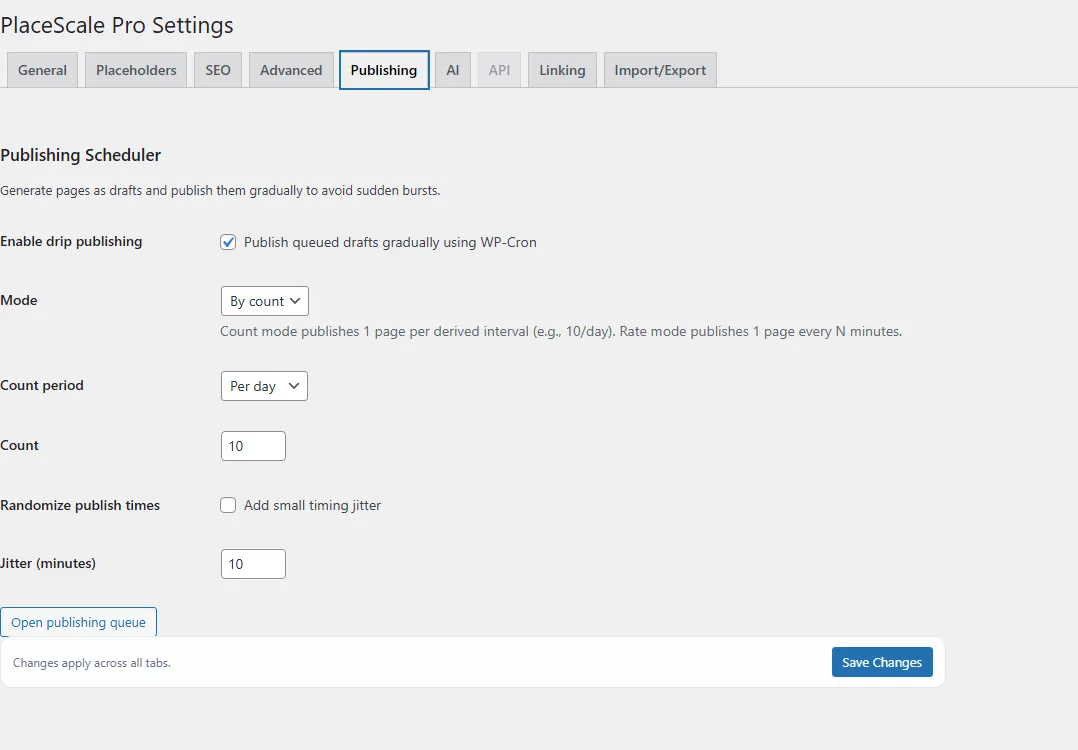
Enable drip publishing
Section titled “Enable drip publishing”Setting:
- Enable drip publishing Recommended
When enabled, PlaceScale can queue pages for gradual publishing.
By count
Section titled “By count”Publish a target number per time period.
Settings:
- Count period: Per day / Per hour
- Count: e.g. 10 per day
By rate
Section titled “By rate”Publish one page every N minutes.
Setting:
- Rate (minutes)
Randomize publish times
Section titled “Randomize publish times”Setting:
- Randomize publish times Optional
- Jitter (minutes)
This adds small timing variation.
How Bulk Generate uses the scheduler
Section titled “How Bulk Generate uses the scheduler”In Bulk Generate, you may see:
- Use Publishing Scheduler (queue as drafts, publish gradually)
When checked:
- selecting “Published” will still create drafts
- drafts are marked for the publishing queue
- WP‑Cron publishes them gradually