
Placeholders & Spintax
Placeholders are tokens like {service} that PlaceScale replaces with real values when generating pages.
Common placeholders
Section titled “Common placeholders”service,serviceslocation,locationsproduct,productscategory,categories
Term metadata (Custom Fields)
Section titled “Term metadata (Custom Fields)”phone,hours,address,email,website
USP Placeholders (AI Slots)
Section titled “USP Placeholders (AI Slots)”USP placeholders inject unique selling points into AI Slot prompts:
Service USPs:
{usp_1}- Primary service benefit{usp_2}- Secondary service benefit{usp_3}- Tertiary service benefit
Location USPs:
{usp_1l}- Primary location benefit (note the “l” suffix){usp_2l}- Secondary location benefit{usp_3l}- Tertiary location benefit
Set USP values on your Terms. The AI receives the actual USP text, not the placeholder syntax.
Date/time
Section titled “Date/time”year,month,day,date
Case variations
Section titled “Case variations”Most placeholders also work in these forms:
{service}- lowercase{Service}- capitalized{SERVICE}- uppercase
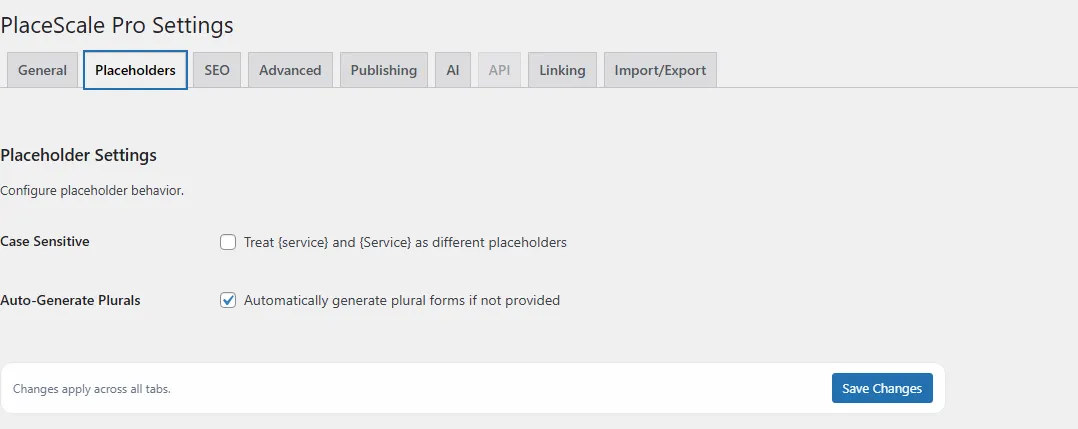
Case sensitivity is controlled in PlaceScale → Settings → Placeholders.
Using Custom Fields as placeholders
Section titled “Using Custom Fields as placeholders”If you store Custom Fields on terms, you can use the field key as a placeholder.
Example:
- Custom Field key:
phone - Template text:
Call us: {phone}
For social preview images, a common Custom Field is:
og_image(full image URL)
Spintax
Section titled “Spintax”Spintax lets you write a small set of variations.
Syntax:
{{option one|option two|option three}}
Notes:
- PlaceScale picks one option per page.
- Output stays stable across regeneration.
Special tokens
Section titled “Special tokens”Internal links
Section titled “Internal links”Token:
{{pscale:links}}
When enabled in settings, this renders an internal links section.
See: Internal linking
Quick checks
Section titled “Quick checks”If something doesn’t replace:
- confirm spelling:
{location}not{loaction} - confirm you selected matching term types in Bulk Generate
- use Bulk Generate → Preview to catch unresolved placeholders
- for USP placeholders, verify the term has USP values set in PlaceScale → Terms
Related: