
AI Settings (BYOK)
PlaceScale can generate content for AI Slots using bring-your-own-key (BYOK) providers.
Open:
- PlaceScale → Settings → AI
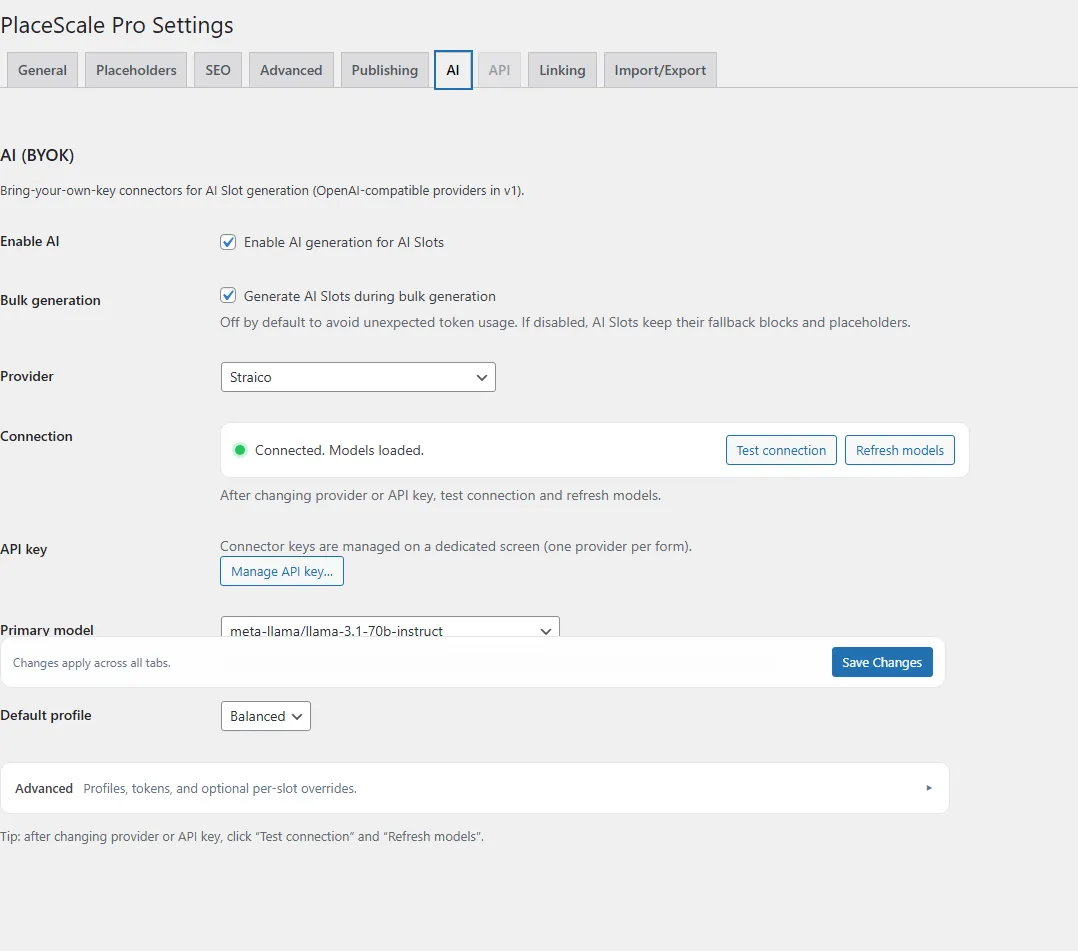
Enable AI
Section titled “Enable AI”Enable Enable AI to allow AI Slot generation. Required
Configure a provider and model
Section titled “Configure a provider and model”The UI is designed to be hard to misconfigure:
- Provider picker (no typing)
- Model picker
- Test connection and Refresh models tools
- Advanced settings in an accordion
- Choose a Provider.
- Click Manage API key… and save your key in AI Connector.
- Back in AI Settings, click Test connection.
- Click Refresh models.
- Choose a Primary model.
- Choose a Default profile (Cheap / Balanced / Quality).
API keys (BYOK)
Section titled “API keys (BYOK)”Keys are managed per-provider in AI Connector.
See: AI Connector
Profiles (Cheap / Balanced / Quality)
Section titled “Profiles (Cheap / Balanced / Quality)”Profiles let you trade off cost vs quality without changing templates.
- Cheap: lowest cost, good for short copy
- Balanced: default choice for most sites
- Quality: higher quality, higher cost
In Advanced, you can configure per-profile model choices and output limits.
Bulk generation guardrails
Section titled “Bulk generation guardrails”Generate AI Slots during bulk generation is optional and is recommended to stay off by default if you want tighter spend control.
- When off: Bulk Generate creates pages using AI Slot fallback content.
- When on: Bulk Generate also generates AI Slots (calls your provider and can incur token costs).
USP Placeholders in AI prompts
Section titled “USP Placeholders in AI prompts”When configuring AI Slots, you can use USP (Unique Selling Point) placeholders in prompt templates:
Service USPs:
{usp_1},{usp_2},{usp_3}- Benefits from the service term
Location USPs:
{usp_1l},{usp_2l},{usp_3l}- Benefits from the location term (note the “l” suffix)
USP values are extracted from term metadata and substituted before the AI sees the prompt. Set USP values on your terms in PlaceScale → Terms.
See Terms for managing USPs and AI Slots for using them in generation.
Post-generation sanitization
Section titled “Post-generation sanitization”PlaceScale includes guardrails to clean AI output:
- Placeholder stripping: Any leftover
{placeholder}patterns are removed from generated content - Prevents parroting: Stops the AI from echoing back placeholder syntax
- Text cleanup: Fixes double spaces and awkward punctuation
This ensures clean output even if the AI occasionally includes placeholder syntax in its response.