
Quick Start
Open:
- PlaceScale → Quick Start
Quick Start only changes settings. It does not create, edit, or delete your pages.
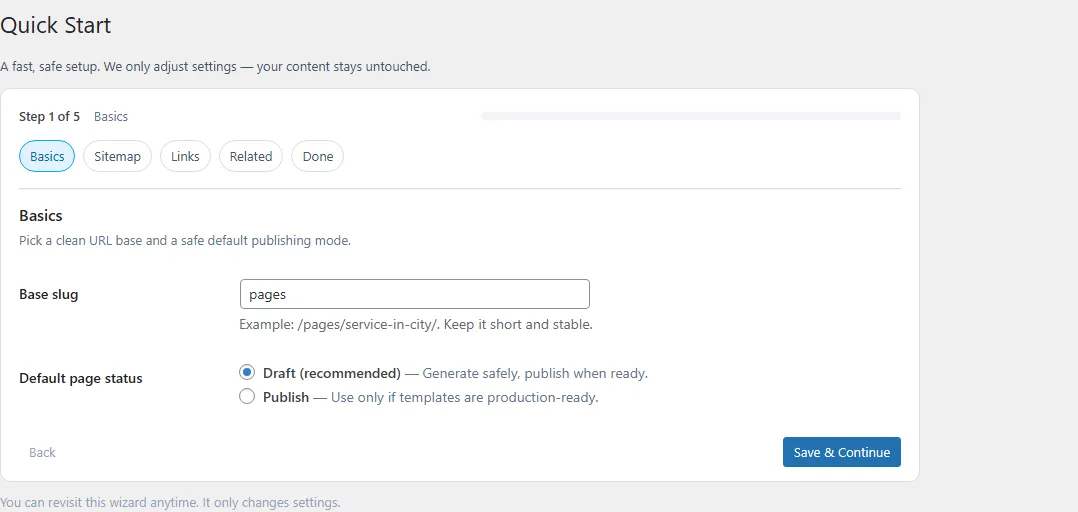
Step 1 — Basics
Section titled “Step 1 — Basics”-
Set Base slug
Base slug controls the URL base for generated pages.
Example:
- Base slug:
pages - Result:
/pages/service-in-location/
Keep it short and stable.
- Base slug:
-
Confirm Default page status
This is the default status used in Bulk Generate.
Step 2 — Sitemap
Section titled “Step 2 — Sitemap”-
Enable sitemap (recommended)
When enabled, PlaceScale generates an XML sitemap for published generated pages.
-
Set sitemap filename
Use a filename like
placescale-sitemap.xml.If you change sitemap settings, you can refresh it from PlaceScale → Tools → Flush sitemap cache.
Step 3 — Internal Links
Section titled “Step 3 — Internal Links”This step prepares the internal links block rendered by:
{{pscale:links}}
-
Enable links block
When enabled, PlaceScale can render
{{pscale:links}}inside templates. -
Set pillar pages (optional but recommended)
You can set:
- All services page
- All locations page
- CTA page (optional)
You can enter a full URL or a WordPress Page ID.
Step 4 — Related Pages
Section titled “Step 4 — Related Pages”-
Enable related pages (optional)
Shows a short list of related generated pages inside the links block.
-
Set a limit
Example: 6
Step 5 — Done
Section titled “Step 5 — Done”Quick Start ends with a checklist:
- Add terms
- Create a template
- Preview and generate